PHASE 1 and 2 TMT PROTEOMICS MERGED: ROSMAP TMT-proteomics Data (read count file)
library(stringr) library(dplyr)
library(ggplot2)
## Warning: package 'ggplot2' was built under R version 4.5.2
library(tidyr) library(DT) # Data set: ROSMAP (N=610), Minimally regressed, batch- and set-corrected protein abundance. Batch within set, and inter-set (ROSMAP set1 and set2) correction handled by separate repeats of TAMPOR (proteins kept with <50% missing values within sets); 610 total cases (syn28723003) protein_data <- read.csv("/Users/poddea/Desktop/ROSMAP_data_100623/TMT_proteomics/Round2/2a.Zero-centered_log2(abundance)-ROSMAP610.R1+R2-2xTAMPORcorrected.csv", sep =",", header = TRUE, stringsAsFactors = FALSE) dim(protein_data)
## [1] 7814 611
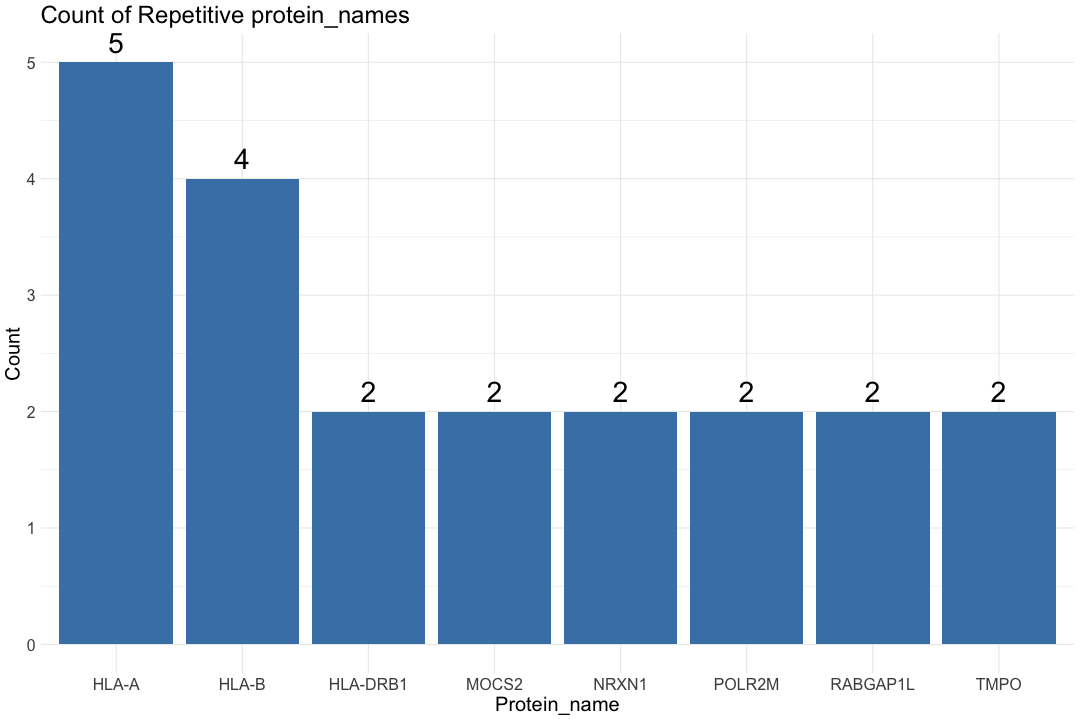
#head(protein_data) # Split the protein_ID column by "|" split_protein_data <- str_split_fixed(protein_data$X, "\\|", 2) # Combine the split data with the original dataframe protein_data$Protein_name <- split_protein_data[, 1] protein_data$Uniprot_ID <- split_protein_data[, 2] # Count the repetitive Protein_name count_data <- protein_data %>% group_by(Protein_name) %>% summarise(count = n()) %>% filter(count > 1) # Print the number of repetitive protein_name cat("Number of repetitive protein_name:", nrow(count_data), "\n")
## Number of repetitive protein_name: 8
# Create a horizontal bar chart ggplot(count_data, aes(x = reorder(Protein_name, -count), y = count)) + geom_bar(stat = "identity", fill = "steelblue") + labs(title = "Count of Repetitive protein_names", x = "Protein_name", y = "Count") + geom_text(aes(label = count), vjust = -0.5, size = 10) + # Add text annotations + theme_minimal() + theme(text = element_text(size=20))

# Find the row (Protein_name) with the highest absolute row sum across all columns for each repetitive Protein_name protein_data_filtered <- protein_data %>% group_by(Protein_name) %>% slice(which.max(abs(rowSums(across(starts_with("b"), is.numeric), na.rm = TRUE)))) %>% ungroup() dim(protein_data_filtered)
## [1] 7801 613
################################################################################################################################################################# ## INPUT data File Filtering - Remove proteins without given name (symbol) ## Used "Protein_name as first column in the data file" # Filter rows where Protein_name is not 0 protein_data_filtered <- protein_data_filtered[protein_data_filtered$Protein_name != "0", ] # Print the number of IDs with protein_name cat("Number of IDs with protein_name:", nrow(protein_data_filtered), "\n")
## Number of IDs with protein_name: 7800
# Remove the Uniprot_ID column protein_data_filtered$Uniprot_ID <- NULL # Replace the first column with Protein_name #protein_data_filtered$X <- protein_data_filtered$Protein_name # Move Protein_name to the first column protein_data_filtered <- protein_data_filtered[, c("Protein_name", setdiff(names(protein_data_filtered), "Protein_name"))] # Remove the "X" column protein_data_filtered$X <- NULL dim(protein_data_filtered)
## [1] 7800 611
# Print the table using DT datatable(protein_data_filtered, options = list(pageLength = 5, autoWidth = TRUE))
## Warning in instance$preRenderHook(instance): It seems your data is too big for ## client-side DataTables. You may consider server-side processing: ## https://rstudio.github.io/DT/server.html

Data Missingness
#PHASE 1 and 2 TMT PROTEOMICS MERGED: ROSMAP TMT-proteomics Metadata (samples description file)
library(stringr) library(dplyr) library(ggplot2) library(tidyr) library(DT) # Read the TMT metadata file for ROSMAP individuals protein_metadata_ROSMAP <- read.csv("/Users/poddea/Desktop/ROSMAP_data_100623/TMT_proteomics/Round2/2c.traits-ROSMAP610.R1+R2-2xTAMPORcorrected.csv", sep =",", header = TRUE, stringsAsFactors = FALSE) #protein_metadata_ROSMAP <- read.table("/Users/poddea/Desktop/ROSMAP_data_100623/TMT_proteomics/Round2/ROSMAP_Covariates_ages_censored.tsv", sep ="\t", header = TRUE, stringsAsFactors = FALSE) dim(protein_metadata_ROSMAP)
## [1] 610 41
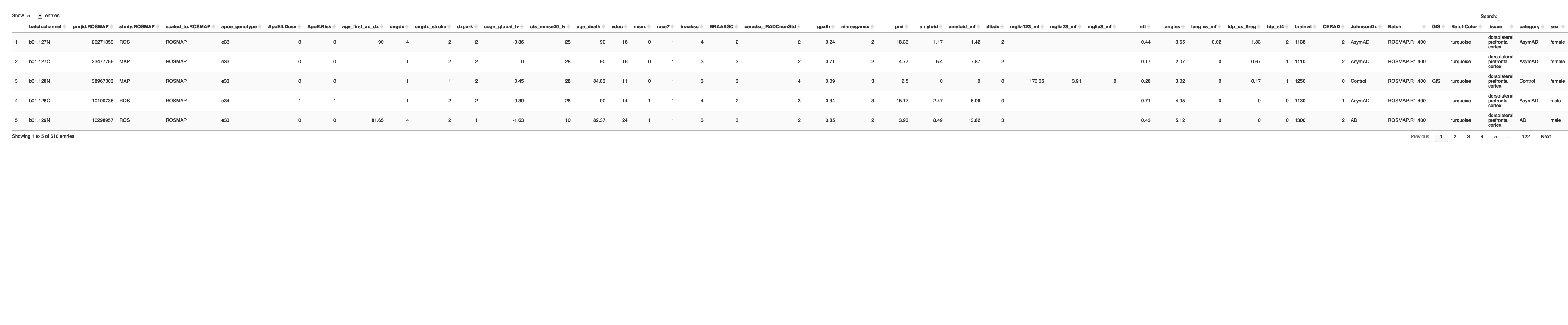
# Define the catagory (diagnosis) based on the braaksc, CERAD and cogdx #protein_metadata_ROSMAP$category <- with(protein_metadata_ROSMAP, ifelse(braaksc >= 4 & ceradsc_RADCnonStd <= 2 & cogdx == 4, "AD", #ifelse(braaksc <= 3 & ceradsc_RADCnonStd >= 3 & cogdx == 1, "CT", "OTHER"))) # Define the category based on Braak, CERAD, and MMSE (cognitive status) protein_metadata_ROSMAP$category <- with(protein_metadata_ROSMAP, ifelse((CERAD %in% 0:1 & braaksc %in% 0:2 & cts_mmse30_lv >= 24) | (CERAD == 0 & braaksc == 3 & cts_mmse30_lv >= 24), "Control", ifelse(CERAD %in% 1:3 & braaksc %in% 3:6 & cts_mmse30_lv >= 24, "AsymAD", ifelse(CERAD %in% 2:3 & braaksc %in% 3:6 & cts_mmse30_lv < 24, "AD", "Exclude")))) # Define the category based on Braak, CERAD, and MMSE (cognitive status) #protein_metadata_ROSMAP$category <- with(protein_metadata_ROSMAP, #ifelse((CERAD %in% 0:1 & braaksc %in% 0:2 & cts_mmse30_lv >= 24) | #(CERAD == 0 & braaksc == 3 & cts_mmse30_lv >= 24), "Control", #ifelse(CERAD %in% 1:3 & braaksc %in% 3:6 & cts_mmse30_lv >= 24, "AsymAD", #ifelse(CERAD %in% 2:3 & braaksc %in% 3:6 & cts_mmse30_lv < 24, "AD", "Exclude")))) # Define the sex_type (sex) based on the msex value protein_metadata_ROSMAP$sex <- with(protein_metadata_ROSMAP, ifelse(msex == 0, "female", ifelse(msex == 1, "male", "NA"))) write.table(protein_metadata_ROSMAP,"Protein_metadata_ROSMAP_catagory.txt",sep="\t",quote=F) # Print the table using DT datatable(protein_metadata_ROSMAP, options = list(pageLength = 5, autoWidth = TRUE))

Removal of outlier samples
# Read the outliers file outliers <- read.table("/Users/poddea/Desktop/ROSMAP_data_100623/TMT_proteomics/Round2/outliers.txt", header = TRUE) # Extract the IDs to be removed ids_to_remove <- outliers$Outliers ids_to_remove
## [1] "b22.130N" "b52.130N" "b56.131C"
# Remove the specified columns from the TMT read count file protein_data_filtered <- protein_data_filtered[, !colnames(protein_data_filtered) %in% ids_to_remove] dim(protein_data_filtered)
## [1] 7800 608
# Use the 'subset' function to remove rows with specified IDs (outliers) from the protein_metadata_ROSMAP protein_metadata_ROSMAP <- subset(protein_metadata_ROSMAP, !(batch.channel %in% ids_to_remove)) dim(protein_metadata_ROSMAP)
## [1] 607 43
Preparation of the input files (Tissue: DLPFC)
# Get the list of proteins from the protein_data_filtered Protein_name <- protein_data_filtered$Protein_name # Get the list of samples from the protein_data_filtered common_samples <- colnames(protein_data_filtered) # Select a sub-set of the sample (Tissue: DLPFC) from protein_metadata_ROSMAP file sample_data_DLPFC <- filter(protein_metadata_ROSMAP, tissue == "dorsolateral prefrontal cortex") # Create a subset of the DLPFC sample description file with control samples only sample_data_DLPFC_contorl <- sample_data_DLPFC[grep("Control", sample_data_DLPFC$JohnsonDx), ] dim(sample_data_DLPFC_contorl)
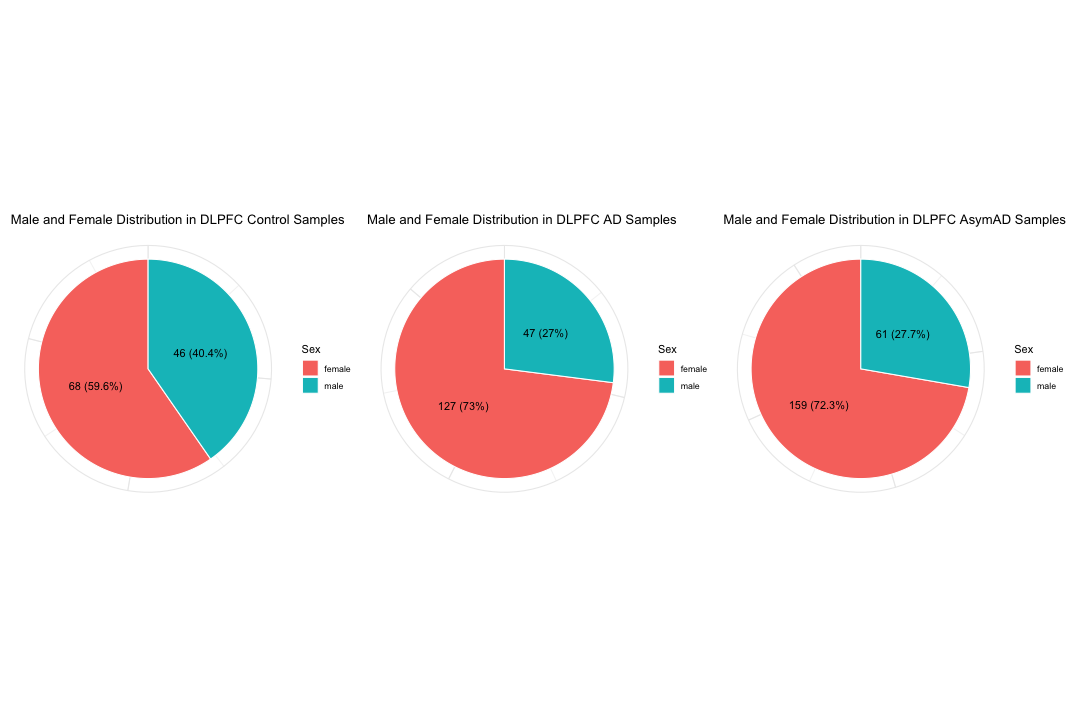
## [1] 114 43
# Create a subset of the DLPFC sample description file with AD samples only #sample_data_DLPFC_case <- sample_data_DLPFC[grep("AD", sample_data_DLPFC$JohnsonDx), ] sample_data_DLPFC_case <- sample_data_DLPFC[sample_data_DLPFC$JohnsonDx == "AD", ] dim(sample_data_DLPFC_case)
## [1] 174 43
# Create a subset of the DLPFC sample description file with AsymAD samples only sample_data_DLPFC_AsymAD <- sample_data_DLPFC[grep("AsymAD", sample_data_DLPFC$JohnsonDx), ] dim(sample_data_DLPFC_AsymAD)
## [1] 220 43
# Calculate the counts and percentages of each sex in control samples sex_counts_control <- table(sample_data_DLPFC_contorl$sex) sex_percentages_control <- prop.table(sex_counts_control) * 100 # Create a pie chart to show the distribution of Male and Female ratio within the control samples pie_data_control <- data.frame(sex = names(sex_counts_control), count = as.numeric(sex_counts_control), percentage = sex_percentages_control) P1 <- ggplot(pie_data_control, aes(x = "", y = count, fill = sex)) + geom_bar(stat = "identity", width = 1, color = "white") + coord_polar("y") + geom_text(aes(label = paste0(count, " (", round(sex_percentages_control, 1), "%)")), position = position_stack(vjust = 0.5)) + # Add text labels with percentages labs(title = "Male and Female Distribution in DLPFC Control Samples", fill = "Sex") + theme_minimal() + theme(axis.text = element_blank(), axis.title = element_blank(), legend.position = "right") # Calculate the counts and percentages of each sex in AD samples sex_counts_case <- table(sample_data_DLPFC_case$sex) sex_percentages_case <- prop.table(sex_counts_case) * 100 # Create a pie chart to show the distribution of Male and Female ratio within the AD samples pie_data_case <- data.frame(sex = names(sex_counts_case), count = as.numeric(sex_counts_case), percentage = sex_percentages_case) P2 <- ggplot(pie_data_case, aes(x = "", y = count, fill = sex)) + geom_bar(stat = "identity", width = 1, color = "white") + coord_polar("y") + geom_text(aes(label = paste0(count, " (", round(sex_percentages_case, 1), "%)")), position = position_stack(vjust = 0.5)) + # Add text labels with percentages labs(title = "Male and Female Distribution in DLPFC AD Samples", fill = "Sex") + theme_minimal() + theme(axis.text = element_blank(), axis.title = element_blank(), legend.position = "right") # Calculate the counts and percentages of each sex in AsymAD samples sex_counts_AsymAD <- table(sample_data_DLPFC_AsymAD$sex) sex_percentages_AsymAD <- prop.table(sex_counts_AsymAD) * 100 # Create a pie chart to show the distribution of Male and Female ratio within the AsymAD samples pie_data_AsymAD <- data.frame(sex = names(sex_counts_AsymAD), count = as.numeric(sex_counts_AsymAD), percentage = sex_percentages_AsymAD) P3 <- ggplot(pie_data_AsymAD, aes(x = "", y = count, fill = sex)) + geom_bar(stat = "identity", width = 1, color = "white") + coord_polar("y") + geom_text(aes(label = paste0(count, " (", round(sex_percentages_AsymAD, 1), "%)")), position = position_stack(vjust = 0.5)) + # Add text labels with percentages labs(title = "Male and Female Distribution in DLPFC AsymAD Samples", fill = "Sex") + theme_minimal() + theme(axis.text = element_blank(), axis.title = element_blank(), legend.position = "right") library(patchwork) P1 | P2 | P3
Data Missingness calculation (DLPFC Sample Only) - exclude proteins with more than 50% missingness throughout the DLPFC Sample
library(ggplot2) library(dplyr) library(ComplexHeatmap)
## Warning: package 'ComplexHeatmap' was built under R version 4.5.1
library(circlize)
library(factoextra)
library(grid) ## Filter DLPFC samples from the data # Select a sub-set of the sample (Tissue: DLPFC) from protein_metadata_ROSMAP file sample_data_DLPFC <- filter(protein_metadata_ROSMAP, tissue == "dorsolateral prefrontal cortex") dim(sample_data_DLPFC)
## [1] 607 43
# Create a list of DLPFC samples only DLPFC_samples <- sample_data_DLPFC$batch.channel # Create a subset of the protein abundant file with CT samples only protein_data_DLPFC <- protein_data_filtered[, intersect(common_samples, DLPFC_samples)] protein_data_DLPFC <- cbind(Protein_name, protein_data_DLPFC) dim(protein_data_DLPFC)
## [1] 7800 608
# Step 1: Calculate the percentage of missing values (NA) for each row protein_data_DLPFC <- protein_data_DLPFC %>% rowwise() %>% mutate(missingness = sum(is.na(c_across(-Protein_name))) / (ncol(.) - 1) * 100) # Step 2: Filter out rows with more than 50% missingness and store the excluded rows excluded_protein_count <- protein_data_DLPFC %>% filter(missingness > 50) cat("Total number of Protein_name entries excluded due to more than 50% missing values:", nrow(excluded_protein_count), "\n")
## Total number of Protein_name entries excluded due to more than 50% missing values: 0
# Step 3: Create the filtered dataset with valid rows protein_data_DLPFC <- protein_data_DLPFC %>% filter(missingness <= 50) %>% select(-missingness) # remove the 'missingness' column from the data dim(protein_data_DLPFC)
## [1] 7800 608
############################################################################################################################################################ ##Calculate the missingness for samples # Remove the "Protein_name" column from the file protein_data_DLPFC_missingness <- protein_data_DLPFC[, -1] #write.table(protein_data_ROSMAP_new,"/Users/poddea/Desktop/protein_data_ROSMAP_new.txt",sep="\t",quote=T) # Transpose gene expression data to have samples as rows protein_data_DLPFC_missingness_missingness_t <- t(protein_data_DLPFC_missingness) dim(protein_data_DLPFC_missingness_missingness_t)
## [1] 607 7800
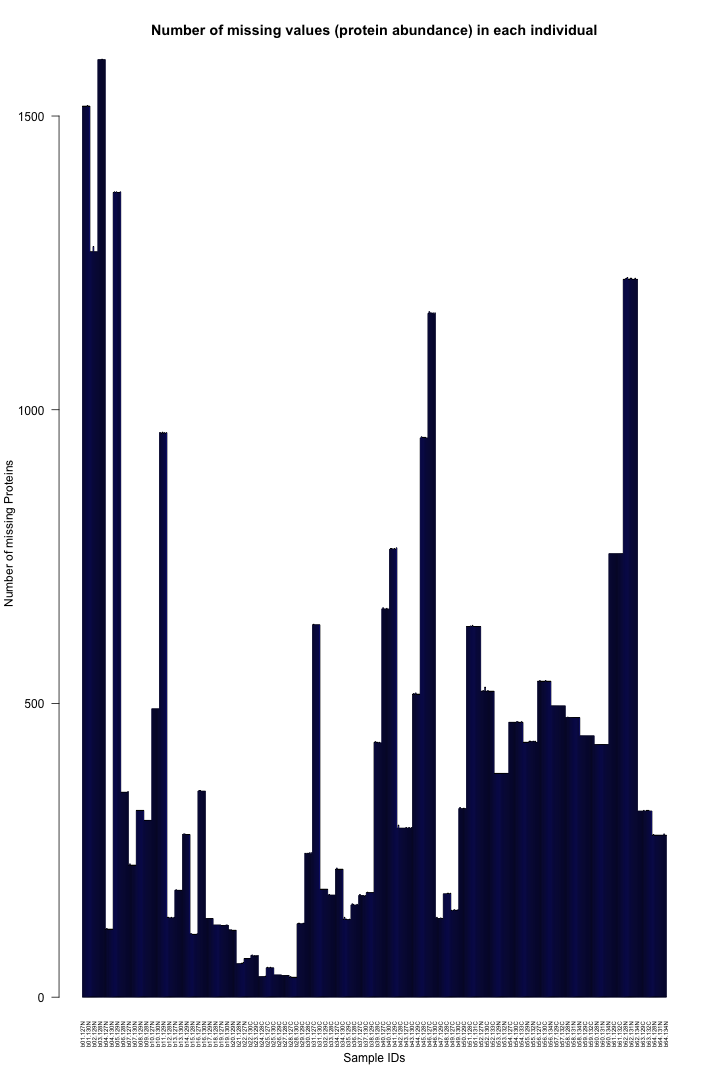
# Calculate the number of NA values in each row na_counts_sample <- apply(protein_data_DLPFC_missingness_missingness_t, 1, function(x) sum(is.na(x))) # Count the number of rows with at least one NA value num_samples_with_na <- sum(na_counts_sample > 0) # Print the total number of rows with at least one NA value cat("Total number of sample with at least one NA value:", num_samples_with_na, "\n")
## Total number of sample with at least one NA value: 607
# Create a barplot for the NA counts with adjusted margins barplot(na_counts_sample, main = "Number of missing values (protein abundance) in each individual", xlab = "Sample IDs", ylab = "Number of missing Proteins", col = "blue", las = 2, cex.names = 0.5)

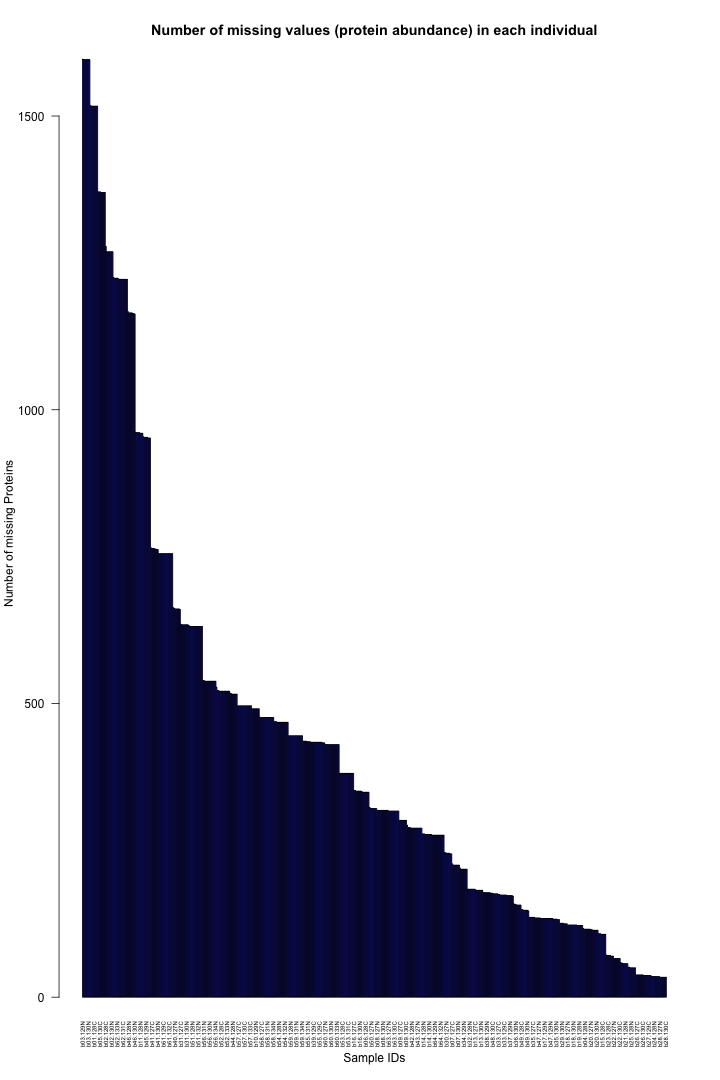
# Sort the data based on the Y-axis values (na_counts_freq) in descending order sorted_indices <- order(na_counts_sample, decreasing = TRUE) na_counts_freq_sorted <- na_counts_sample[sorted_indices] bar_positions_sorted <- bar_positions[sorted_indices]
## Error: object 'bar_positions' not found
# Create the barplot with the sorted data barplot(na_counts_freq_sorted, main = "Number of missing values (protein abundance) in each individual", xlab = "Sample IDs", ylab = "Number of missing Proteins", col = "blue", las = 2, cex.names = 0.5)

############################################################################################################################################################ ##Calculate the missingness for Protein # Remove the first row "Protein_name" from the file protein_data_DLPFC_missingness <- protein_data_DLPFC[-1, ] # Calculate the number of NA values in each row na_counts_genes <- apply(protein_data_DLPFC_missingness, 1, function(x) sum(is.na(x))) # Count the number of rows with at least one NA value num_genes_with_na <- sum(na_counts_genes > 0) # Print the total number of rows with at least one NA value cat("Total number of gene with at least one NA value:", num_genes_with_na, "\n")
## Total number of gene with at least one NA value: 2907
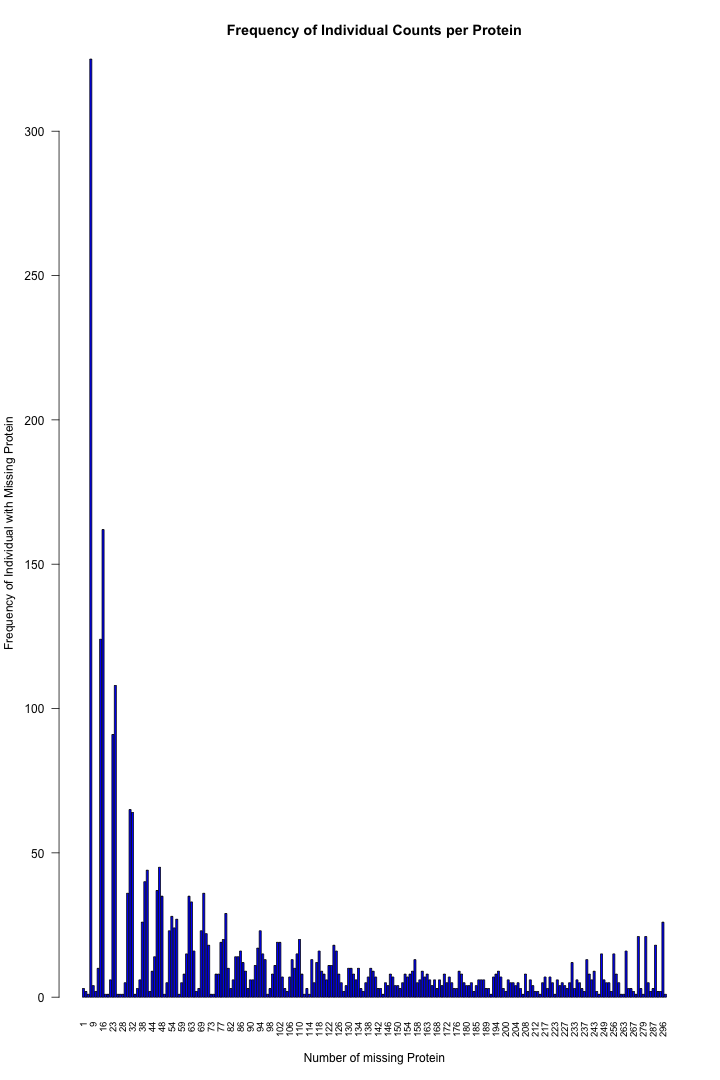
# Count the frequency of each unique NA value na_counts_freq <- table(na_counts_genes) #write.table(na_counts_freq,"/Users/poddea/Desktop/na_counts_freq.txt",sep="\t",quote=F) # Remove the entry for 0 NAs na_counts_freq <- na_counts_freq[names(na_counts_freq) != "0"] # Create the barplot and store the bar positions bar_positions <- barplot(na_counts_freq, main = "Frequency of Individual Counts per Protein", xlab = "Number of missing Protein", ylab = "Frequency of Individual with Missing Protein", col = "blue", las = 2, cex.names = 0.8)

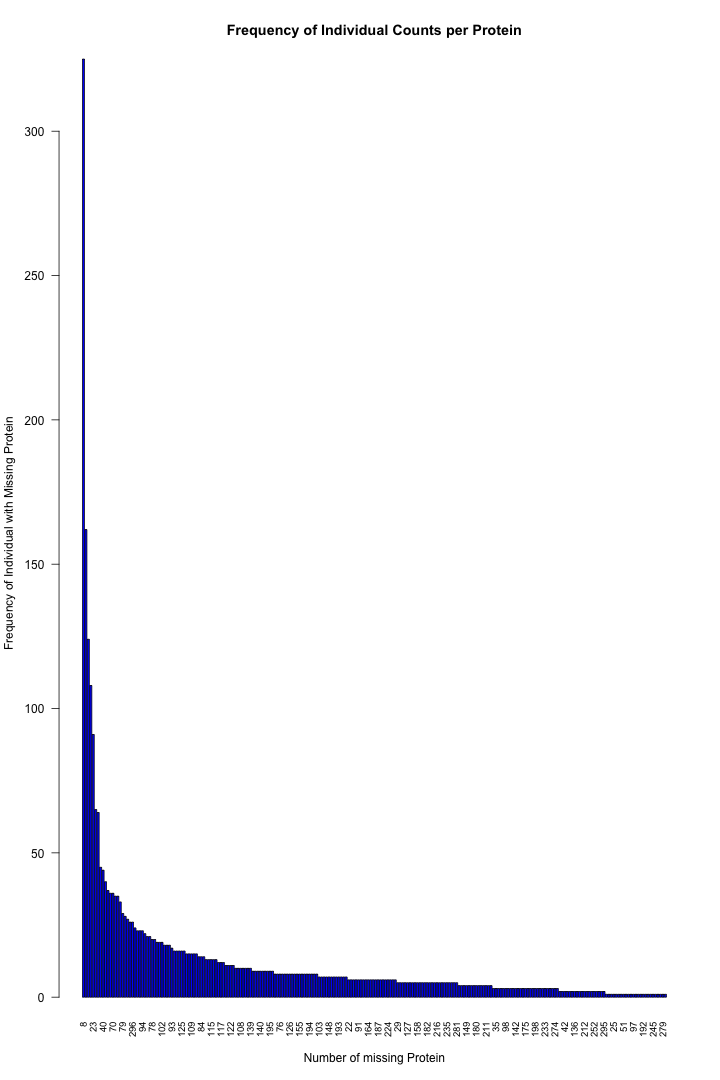
# Sort the data based on the Y-axis values (na_counts_freq) in descending order sorted_indices <- order(na_counts_freq, decreasing = TRUE) na_counts_freq_sorted <- na_counts_freq[sorted_indices] bar_positions_sorted <- bar_positions[sorted_indices] # Create the barplot with the sorted data barplot(na_counts_freq_sorted, main = "Frequency of Individual Counts per Protein", xlab = "Number of missing Protein", ylab = "Frequency of Individual with Missing Protein", col = "blue", las = 2, cex.names = 0.8)

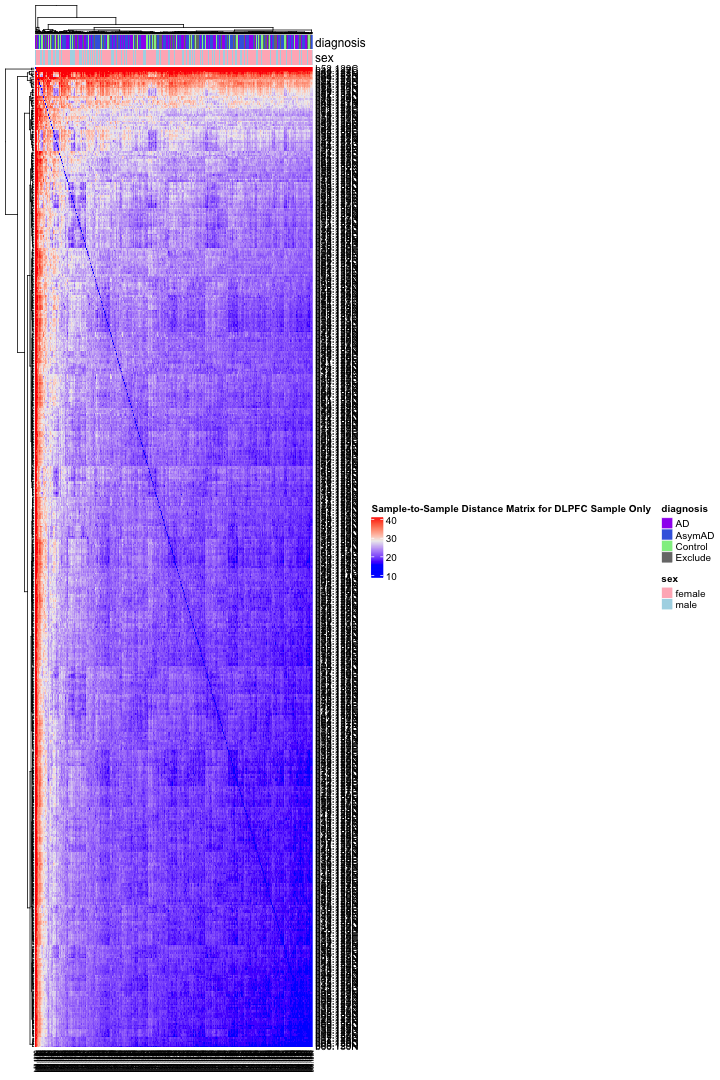
############################################################################################################################################################ ## Sample-to-Sample distance matrix protein_data_DLPFC_new <- protein_data_DLPFC[, -1] # Transpose the protein abundant file to get sample_IDs in the rows protein_data_DLPFC_t <- t(protein_data_DLPFC_new) dim(protein_data_DLPFC_t)
## [1] 607 7800
# Compute the Sample-to-Sample Distance Matrix using Euclidean distance distance_matrix <- dist(protein_data_DLPFC_t) # Convert the distance matrix to a data frame distance_df <- as.data.frame(as.matrix(distance_matrix)) write.table(distance_df,"distance_matrix.txt",sep="\t",quote=FALSE, row.names=TRUE) max(distance_df)
## [1] 76.10121
# Preparing a column annotation file col_ha = HeatmapAnnotation( diagnosis = sample_data_DLPFC$JohnsonDx, sex = sample_data_DLPFC$sex, annotation_height = unit(c(12, 12), "cm"), col = list( diagnosis = c("AD" = "purple", "Control" = "lightgreen", "AsymAD" = "royalblue", "Exclude" = "gray47"), sex = c("male" = "lightblue", "female" = "lightpink") ) ) # Create the heatmap object ht <- Heatmap( as.matrix(distance_matrix), name = "Sample-to-Sample Distance Matrix for DLPFC Sample Only", top_annotation = col_ha, row_names_gp = gpar(fontsize = 10), # Top 10 rows larger column_names_gp = gpar(fontsize = 5) )
# Draw the heatmap draw(ht)

Principal Component Analysis (DLPFC - Control Sample Only)
#Sample-Sample Distance Matrix (DLPFC - Control Sample Only)
#Separate Male and Female Sample Specific Files for Control, AD and AsymAD
library(gplots)
## Filter CONTROL-FEMALE samples from the data # Create a list of DLPFC control (female) samples only DLPFC_CT_samples_female <- sample_data_DLPFC$batch.channel[sample_data_DLPFC$JohnsonDx == "Control" & sample_data_DLPFC$sex == "female"] # Create a subset of the protein abundant file with CT (female) samples only protein_data_DLPFC_CT_female <- protein_data_DLPFC[, intersect(common_samples, DLPFC_CT_samples_female)] protein_data_DLPFC_CT_female <- cbind(Protein_name, protein_data_DLPFC_CT_female) dim(protein_data_DLPFC_CT_female)
## [1] 7800 69
write.table(protein_data_DLPFC_CT_female,"protein_data_DLPFC_CT_female.txt",sep="\t",quote=FALSE, row.names=FALSE) datatable(protein_data_DLPFC_CT_female, options = list(pageLength = 5, autoWidth = TRUE))
## Warning in instance$preRenderHook(instance): It seems your data is too big for ## client-side DataTables. You may consider server-side processing: ## https://rstudio.github.io/DT/server.html

# Create a subset of the description file with CT samples only sample_data_DLPFC_CT <- sample_data_DLPFC[grep("Control", sample_data_DLPFC$JohnsonDx), ] # Create a subset of the CT sample description file with female samples only sample_data_DLPFC_CT_female <- sample_data_DLPFC_CT[grep("female", sample_data_DLPFC_CT$sex), ] dim(sample_data_DLPFC_CT_female)
## [1] 68 43
######################################################################################################################################### ## Filter CONTROL-MALE samples from the data # Create a list of DLPFC CT (male) samples only DLPFC_CT_samples_male <- sample_data_DLPFC$batch.channel[sample_data_DLPFC$JohnsonDx == "Control" & sample_data_DLPFC$sex == "male"] # Create a subset of the protein abundant file with CT (male) samples only protein_data_DLPFC_CT_male <- protein_data_DLPFC[, intersect(common_samples, DLPFC_CT_samples_male)] protein_data_DLPFC_CT_male <- cbind(Protein_name, protein_data_DLPFC_CT_male) dim(protein_data_DLPFC_CT_male)
## [1] 7800 47
write.table(protein_data_DLPFC_CT_male,"protein_data_DLPFC_CT_male.txt",sep="\t",quote=FALSE, row.names=FALSE) datatable(protein_data_DLPFC_CT_male, options = list(pageLength = 5, autoWidth = TRUE))
## Warning in instance$preRenderHook(instance): It seems your data is too big for ## client-side DataTables. You may consider server-side processing: ## https://rstudio.github.io/DT/server.html

# Create a subset of the description file with CT samples only sample_data_DLPFC_CT <- sample_data_DLPFC[grep("Control", sample_data_DLPFC$JohnsonDx), ] # Create a subset of the CT sample description file with male samples only sample_data_DLPFC_CT_male <- sample_data_DLPFC_CT[sample_data_DLPFC_CT$sex == "male", ] dim(sample_data_DLPFC_CT_male)
## [1] 46 43
######################################################################################################################################### ## Filter AD-FEMALE samples from the data # Create a listof DLPFC AD (female) samples only DLPFC_AD_samples_female <- sample_data_DLPFC$batch.channel[sample_data_DLPFC$JohnsonDx == "AD" & sample_data_DLPFC$sex == "female"] # Create a subset of the protein abundant file with AD (female) samples only protein_data_DLPFC_AD_female <- protein_data_DLPFC[, intersect(common_samples, DLPFC_AD_samples_female)] protein_data_DLPFC_AD_female <- cbind(Protein_name, protein_data_DLPFC_AD_female) dim(protein_data_DLPFC_AD_female)
## [1] 7800 128
write.table(protein_data_DLPFC_AD_female,"protein_data_DLPFC_AD_female.txt",sep="\t",quote=FALSE, row.names=FALSE) datatable(protein_data_DLPFC_AD_female, options = list(pageLength = 5, autoWidth = TRUE))
## Warning in instance$preRenderHook(instance): It seems your data is too big for ## client-side DataTables. You may consider server-side processing: ## https://rstudio.github.io/DT/server.html

# Create a subset of the description file with AD samples only sample_data_DLPFC_AD <- sample_data_DLPFC[sample_data_DLPFC$JohnsonDx == "AD", ] # Create a subset of the AD sample description file with female samples only sample_data_DLPFC_AD_female <- sample_data_DLPFC_AD[grep("female", sample_data_DLPFC_AD$sex), ] dim(sample_data_DLPFC_AD_female)
## [1] 127 43
######################################################################################################################################### ## Filter AD-MALE samples from the data # Create a listof DLPFC AD (male) samples only DLPFC_AD_samples_male <- sample_data_DLPFC$batch.channel[sample_data_DLPFC$JohnsonDx == "AD" & sample_data_DLPFC$sex == "male"] # Create a subset of the protein abundant file with AD (male) samples only protein_data_DLPFC_AD_male <- protein_data_DLPFC[, intersect(common_samples, DLPFC_AD_samples_male)] protein_data_DLPFC_AD_male <- cbind(Protein_name, protein_data_DLPFC_AD_male) dim(protein_data_DLPFC_AD_male)
## [1] 7800 48
write.table(protein_data_DLPFC_AD_male,"protein_data_DLPFC_AD_male.txt",sep="\t",quote=FALSE, row.names=FALSE) datatable(protein_data_DLPFC_AD_male, options = list(pageLength = 5, autoWidth = TRUE))
## Warning in instance$preRenderHook(instance): It seems your data is too big for ## client-side DataTables. You may consider server-side processing: ## https://rstudio.github.io/DT/server.html

# Create a subset of the description file with AD samples only sample_data_DLPFC_AD <- sample_data_DLPFC[sample_data_DLPFC$JohnsonDx == "AD", ] # Create a subset of the AD sample description file with male samples only sample_data_DLPFC_AD_male <- sample_data_DLPFC_AD[sample_data_DLPFC_AD$sex == "male", ] dim(sample_data_DLPFC_AD_male)
## [1] 47 43
######################################################################################################################################### ## Filter AsymAD-FEMALE samples from the data # Create a listof DLPFC AsymAD (female) samples only DLPFC_AsymAD_samples_female <- sample_data_DLPFC$batch.channel[sample_data_DLPFC$JohnsonDx == "AsymAD" & sample_data_DLPFC$sex == "female"] # Create a subset of the protein abundant file with AsymAD (female) samples only protein_data_DLPFC_AsymAD_female <- protein_data_DLPFC[, intersect(common_samples, DLPFC_AsymAD_samples_female)] protein_data_DLPFC_AsymAD_female <- cbind(Protein_name, protein_data_DLPFC_AsymAD_female) dim(protein_data_DLPFC_AsymAD_female)
## [1] 7800 160
write.table(protein_data_DLPFC_AsymAD_female,"protein_data_DLPFC_AsymAD_female.txt",sep="\t",quote=FALSE, row.names=FALSE) datatable(protein_data_DLPFC_AsymAD_female, options = list(pageLength = 5, autoWidth = TRUE))
## Warning in instance$preRenderHook(instance): It seems your data is too big for ## client-side DataTables. You may consider server-side processing: ## https://rstudio.github.io/DT/server.html

# Create a subset of the description file with AsymAD samples only sample_data_DLPFC_AsymAD <- sample_data_DLPFC[sample_data_DLPFC$JohnsonDx == "AsymAD", ] # Create a subset of the AsymAD sample description file with female samples only sample_data_DLPFC_AsymAD_female <- sample_data_DLPFC_AsymAD[grep("female", sample_data_DLPFC_AsymAD$sex), ] dim(sample_data_DLPFC_AsymAD_female)
## [1] 159 43
######################################################################################################################################### ## Filter AsymAD-MALE samples from the data # Create a listof DLPFC AsymAD (male) samples only DLPFC_AsymAD_samples_male <- sample_data_DLPFC$batch.channel[sample_data_DLPFC$JohnsonDx == "AsymAD" & sample_data_DLPFC$sex == "male"] # Create a subset of the protein abundant file with AsymAD (male) samples only protein_data_DLPFC_AsymAD_male <- protein_data_DLPFC[, intersect(common_samples, DLPFC_AsymAD_samples_male)] protein_data_DLPFC_AsymAD_male <- cbind(Protein_name, protein_data_DLPFC_AsymAD_male) dim(protein_data_DLPFC_AsymAD_male)
## [1] 7800 62
write.table(protein_data_DLPFC_AsymAD_male,"protein_data_DLPFC_AsymAD_male.txt",sep="\t",quote=FALSE, row.names=FALSE) datatable(protein_data_DLPFC_AsymAD_male, options = list(pageLength = 5, autoWidth = TRUE))
## Warning in instance$preRenderHook(instance): It seems your data is too big for ## client-side DataTables. You may consider server-side processing: ## https://rstudio.github.io/DT/server.html

# Create a subset of the description file with AsymAD samples only sample_data_DLPFC_AsymAD <- sample_data_DLPFC[sample_data_DLPFC$JohnsonDx == "AsymAD", ] # Create a subset of the AsymAD sample description file with male samples only sample_data_DLPFC_AsymAD_male <- sample_data_DLPFC_AsymAD[sample_data_DLPFC_AsymAD$sex == "male", ] dim(sample_data_DLPFC_AsymAD_male)
## [1] 61 43
Calculating AD and AsymAD Samples Specific Z-score by Averaging the Control Gruop
library(ggplot2) library(RColorBrewer) library(scales) library(gplots) library(dplyr) library(tidyr) ## Function to calculate MEAN and SD for each gene within the Control Female samples # Calculation of MEAN for each row protein_data_DLPFC_CT_female$MEAN <- rowMeans(protein_data_DLPFC_CT_female[, -1], na.rm=T) # Calculation of SD for each row protein_data_DLPFC_CT_female$SD <- apply( protein_data_DLPFC_CT_female[, -1], 1, sd, na.rm=TRUE) #write.table(protein_data_DLPFC_CT_female,"protein_data_DLPFC_CT_female.txt",sep="\t",quote=FALSE, row.names=FALSE) # Print the table using DT datatable(protein_data_DLPFC_CT_female, options = list(pageLength = 5, autoWidth = TRUE))
## Warning in instance$preRenderHook(instance): It seems your data is too big for ## client-side DataTables. You may consider server-side processing: ## https://rstudio.github.io/DT/server.html

# Plot the distribution of MEAN and SD for all the genes throughout the control female samples #ggplot(protein_data_DLPFC_CT_female, aes(x = Protein_name, y = MEAN)) + #geom_boxplot(aes(group = Protein_name), #position = position_dodge(0.8), #outlier.shape = NA) + #ggtitle("Distribution of expression statistics of the proteins in control samples (female)") + #theme(axis.text.x = element_text(angle = 45, hjust = 1)) ######################################################################################################################################### ## Function to calculate MEAN and SD for each gene within the Control male samples # Calculation of MEAN for each row protein_data_DLPFC_CT_male$MEAN <- rowMeans(protein_data_DLPFC_CT_male[, -1], na.rm=T) # Calculation of SD for each row protein_data_DLPFC_CT_male$SD <- apply( protein_data_DLPFC_CT_male[, -1], 1, sd, na.rm=TRUE) #write.table(protein_data_DLPFC_CT_male,"protein_data_DLPFC_CT_male.txt",sep="\t",quote=FALSE, row.names=FALSE) # Print the table using DT datatable(protein_data_DLPFC_CT_male, options = list(pageLength = 5, autoWidth = TRUE))
## Warning in instance$preRenderHook(instance): It seems your data is too big for ## client-side DataTables. You may consider server-side processing: ## https://rstudio.github.io/DT/server.html

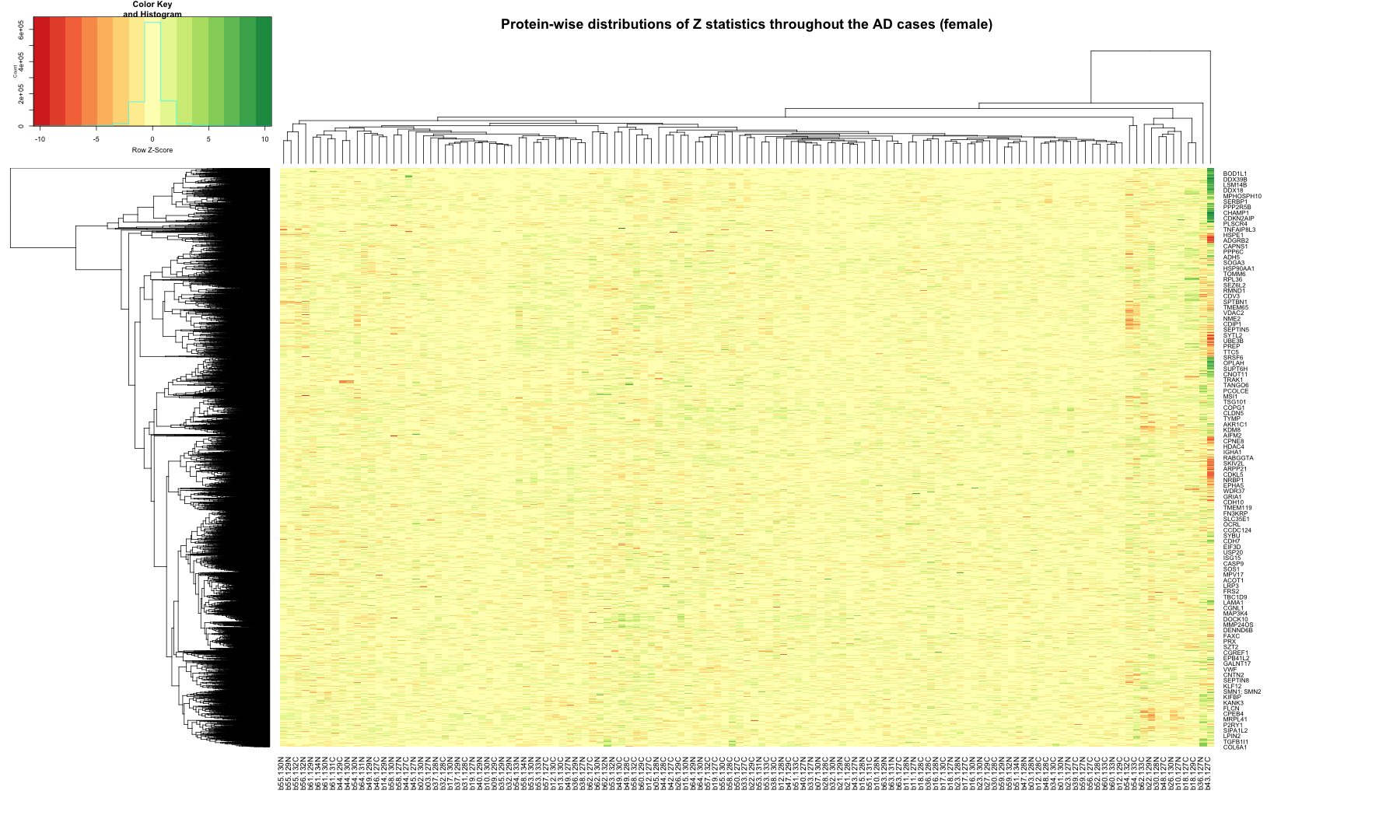
# Plot the distribution of MEAN and SD for all the genes throughout the control male samples #ggplot(protein_data_DLPFC_CT_male, aes(x = Protein_name, y = MEAN)) + #geom_boxplot(aes(group = Protein_name), #position = position_dodge(0.8), #outlier.shape = NA) + #ggtitle("Distribution of expression statistics of the proteins in control samples (male)") + #theme(axis.text.x = element_text(angle = 45, hjust = 1)) ######################################################################################################################################### ## Function to calculate the Z-statistics i.e. (VALUE - MEAN) / SD for each protein where VALUE is a abundant count for each protein in each AD female sample # Function define to calculate the Z statistics z_stat <- function(row, mean_val, sd_val) { (row - mean_val) / sd_val } # Select the AD columns for calculation selected_AD_female <- protein_data_DLPFC_AD_female[, -1] # Calculate the Z statistics for each row using sweep z_stat_AD_female <- sweep(selected_AD_female, 1, protein_data_DLPFC_CT_female$MEAN, FUN = "-") z_stat_AD_female <- sweep(z_stat_AD_female, 1, protein_data_DLPFC_CT_female$SD, FUN = "/") # Create a new data frame with the results z_stat_result_AD_female <- data.frame(z_stat_AD_female) # Rename the columns of the result data frame colnames(z_stat_result_AD_female) <- paste0(colnames(selected_AD_female), "_Zscore") #Combine the Protein_name with the Z statistics result z_stat_result_plot_AD_female <- cbind(Protein_name, z_stat_result_AD_female) # Combine the original AD data frame with the Z statistics result data frame #z_stat_result_table_female <- cbind(AD_female, z_stat_result_female) # Print the table using DT datatable(z_stat_result_plot_AD_female, options = list(pageLength = 5, autoWidth = TRUE))
## Warning in instance$preRenderHook(instance): It seems your data is too big for ## client-side DataTables. You may consider server-side processing: ## https://rstudio.github.io/DT/server.html

# Print the Z statistics result final table write.table(z_stat_result_plot_AD_female,"z_stat_result_AD_female.txt",sep="\t",quote=FALSE, row.names=FALSE) # Remove the header from the file z_stat_result_matrix_AD_female <- z_stat_result_plot_AD_female[, -1] # Replace NA, NaN, or Inf values with 0 cleaned_matrix_AD_female <- replace(z_stat_result_matrix_AD_female, is.na(z_stat_result_matrix_AD_female), 0) # Set up the color scale using RColorBrewer color_scale <- colorRampPalette(brewer.pal(9, "RdYlGn")) # Plot the heatmap out_zscore_AD_female <- heatmap.2( as.matrix(cleaned_matrix_AD_female), Rowv = TRUE, Colv = TRUE, col = color_scale, scale = "row", trace = "none", margins = c(10, 20), key = TRUE, keysize = 1, cexCol = 1, cexRow = 0.8, labCol = sample_data_DLPFC_AD_female$batch.channel, labRow = z_stat_result_plot_AD_female$Protein_name, dendrogram = "both", main = "Protein-wise distributions of Z statistics throughout the AD cases (female)" )

######################################################################################################################################### ## Function to calculate the Z-statistics i.e. (VALUE - MEAN) / SD for each protein where VALUE is a abundant count for each protein in each AD male sample # Function define to calculate the Z statistics z_stat <- function(row, mean_val, sd_val) { (row - mean_val) / sd_val } # Select the AD columns for calculation selected_AD_male <- protein_data_DLPFC_AD_male[, -1] # Calculate the Z statistics for each row using sweep z_stat_AD_male <- sweep(selected_AD_male, 1, protein_data_DLPFC_CT_male$MEAN, FUN = "-") z_stat_AD_male <- sweep(z_stat_AD_male, 1, protein_data_DLPFC_CT_male$SD, FUN = "/") # Create a new data frame with the results z_stat_result_AD_male <- data.frame(z_stat_AD_male) # Rename the columns of the result data frame colnames(z_stat_result_AD_male) <- paste0(colnames(selected_AD_male), "_Zscore") #Combine the Protein_name with the Z statistics result z_stat_result_plot_AD_male <- cbind(Protein_name, z_stat_result_AD_male) # Combine the original AD data frame with the Z statistics result data frame #z_stat_result_table_male <- cbind(AD_male, z_stat_result_male) # Print the table using DT datatable(z_stat_result_plot_AD_male, options = list(pageLength = 5, autoWidth = TRUE))
## Warning in instance$preRenderHook(instance): It seems your data is too big for ## client-side DataTables. You may consider server-side processing: ## https://rstudio.github.io/DT/server.html

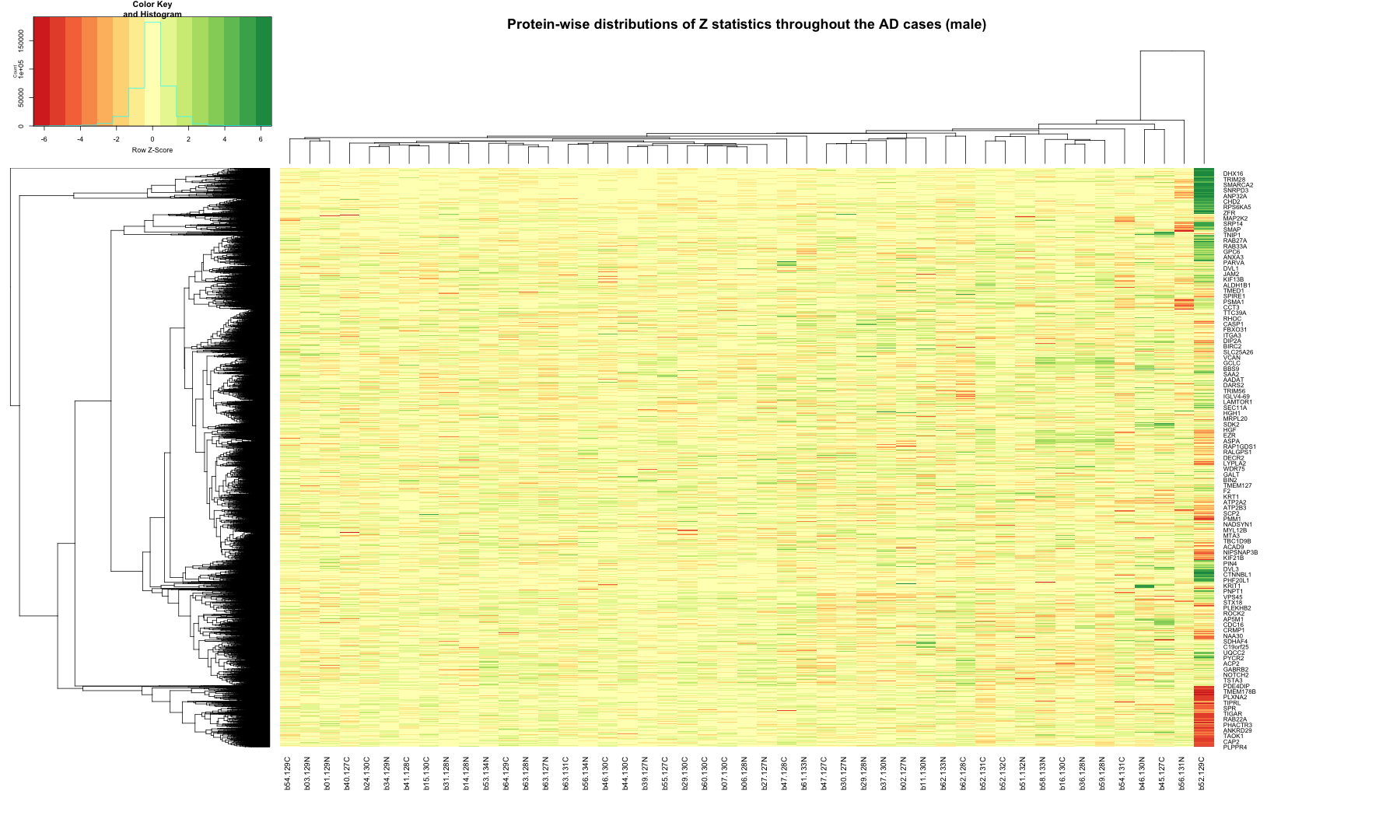
# Print the Z statistics result final table write.table(z_stat_result_plot_AD_male,"z_stat_result_AD_male.txt",sep="\t",quote=FALSE, row.names=FALSE) # Remove the header from the file z_stat_result_matrix_AD_male <- z_stat_result_plot_AD_male[, -1] # Replace NA, NaN, or Inf values with 0 cleaned_matrix_AD_male <- replace(z_stat_result_matrix_AD_male, is.na(z_stat_result_matrix_AD_male), 0) # Set up the color scale using RColorBrewer color_scale <- colorRampPalette(brewer.pal(9, "RdYlGn")) # Plot the heatmap out_zscore_AD_male <- heatmap.2( as.matrix(cleaned_matrix_AD_male), Rowv = TRUE, Colv = TRUE, col = color_scale, scale = "row", trace = "none", margins = c(10, 20), key = TRUE, keysize = 1, cexCol = 1, cexRow = 0.8, labCol = sample_data_DLPFC_AD_male$batch.channel, labRow = z_stat_result_plot_AD_male$Protein_name, dendrogram = "both", main = "Protein-wise distributions of Z statistics throughout the AD cases (male)" )

######################################################################################################################################### ## Function to calculate the Z-statistics i.e. (VALUE - MEAN) / SD for each protein where VALUE is a abundant count for each protein in each AsymAD female sample # Function define to calculate the Z statistics z_stat <- function(row, mean_val, sd_val) { (row - mean_val) / sd_val } # Select the AsymAD columns for calculation selected_AsymAD_female <- protein_data_DLPFC_AsymAD_female[, -1] # Calculate the Z statistics for each row using sweep z_stat_AsymAD_female <- sweep(selected_AsymAD_female, 1, protein_data_DLPFC_CT_female$MEAN, FUN = "-") z_stat_AsymAD_female <- sweep(z_stat_AsymAD_female, 1, protein_data_DLPFC_CT_female$SD, FUN = "/") # Create a new data frame with the results z_stat_result_AsymAD_female <- data.frame(z_stat_AsymAD_female) # Rename the columns of the result data frame colnames(z_stat_result_AsymAD_female) <- paste0(colnames(selected_AsymAD_female), "_Zscore") #Combine the Protein_name with the Z statistics result z_stat_result_plot_AsymAD_female <- cbind(Protein_name, z_stat_result_AsymAD_female) # Combine the original AsymAD data frame with the Z statistics result data frame #z_stat_result_table_female <- cbind(AsymAD_female, z_stat_result_female) # Print the table using DT datatable(z_stat_result_plot_AsymAD_female, options = list(pageLength = 5, autoWidth = TRUE))
## Warning in instance$preRenderHook(instance): It seems your data is too big for ## client-side DataTables. You may consider server-side processing: ## https://rstudio.github.io/DT/server.html

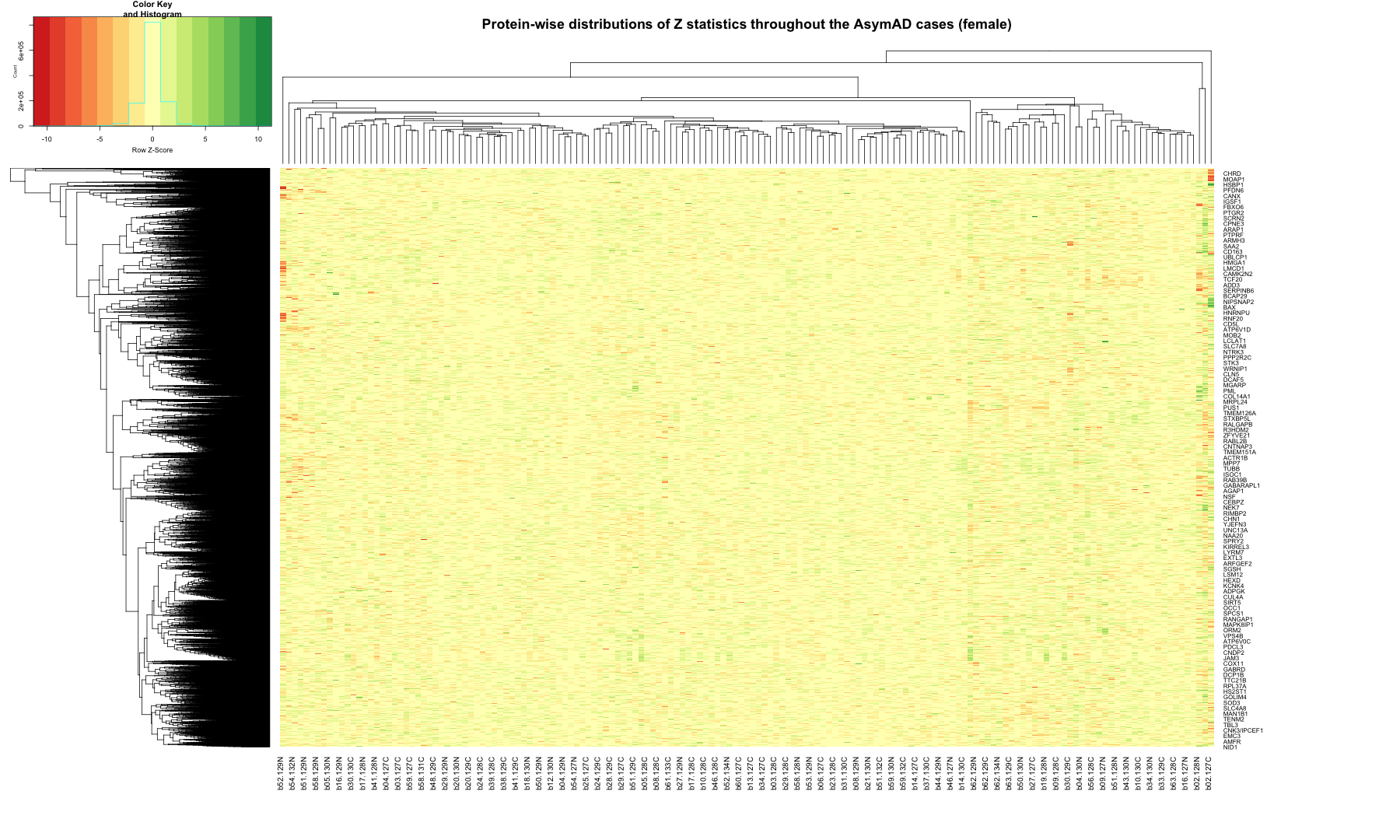
# Print the Z statistics result final table write.table(z_stat_result_plot_AsymAD_female,"z_stat_result_AsymAD_female.txt",sep="\t",quote=FALSE, row.names=FALSE) # Remove the header from the file z_stat_result_matrix_AsymAD_female <- z_stat_result_plot_AsymAD_female[, -1] # Replace NA, NaN, or Inf values with 0 cleaned_matrix_AsymAD_female <- replace(z_stat_result_matrix_AsymAD_female, is.na(z_stat_result_matrix_AsymAD_female), 0) # Set up the color scale using RColorBrewer color_scale <- colorRampPalette(brewer.pal(9, "RdYlGn")) # Plot the heatmap out_zscore_AsymAD_female <- heatmap.2( as.matrix(cleaned_matrix_AsymAD_female), Rowv = TRUE, Colv = TRUE, col = color_scale, scale = "row", trace = "none", margins = c(10, 20), key = TRUE, keysize = 1, cexCol = 1, cexRow = 0.8, labCol = sample_data_DLPFC_AsymAD_female$batch.channel, labRow = z_stat_result_plot_AsymAD_female$Protein_name, dendrogram = "both", main = "Protein-wise distributions of Z statistics throughout the AsymAD cases (female)" )

######################################################################################################################################### ## Function to calculate the Z-statistics i.e. (VALUE - MEAN) / SD for each protein where VALUE is a abundant count for each protein in each AsymAD male sample # Function define to calculate the Z statistics z_stat <- function(row, mean_val, sd_val) { (row - mean_val) / sd_val } # Select the AsymAD columns for calculation selected_AsymAD_male <- protein_data_DLPFC_AsymAD_male[, -1] # Calculate the Z statistics for each row using sweep z_stat_AsymAD_male <- sweep(selected_AsymAD_male, 1, protein_data_DLPFC_CT_male$MEAN, FUN = "-") z_stat_AsymAD_male <- sweep(z_stat_AsymAD_male, 1, protein_data_DLPFC_CT_male$SD, FUN = "/") # Create a new data frame with the results z_stat_result_AsymAD_male <- data.frame(z_stat_AsymAD_male) # Rename the columns of the result data frame colnames(z_stat_result_AsymAD_male) <- paste0(colnames(selected_AsymAD_male), "_Zscore") #Combine the Protein_name with the Z statistics result z_stat_result_plot_AsymAD_male <- cbind(Protein_name, z_stat_result_AsymAD_male) # Combine the original AsymAD data frame with the Z statistics result data frame #z_stat_result_table_male <- cbind(AsymAD_male, z_stat_result_male) # Print the table using DT datatable(z_stat_result_plot_AsymAD_male, options = list(pageLength = 5, autoWidth = TRUE))
## Warning in instance$preRenderHook(instance): It seems your data is too big for ## client-side DataTables. You may consider server-side processing: ## https://rstudio.github.io/DT/server.html

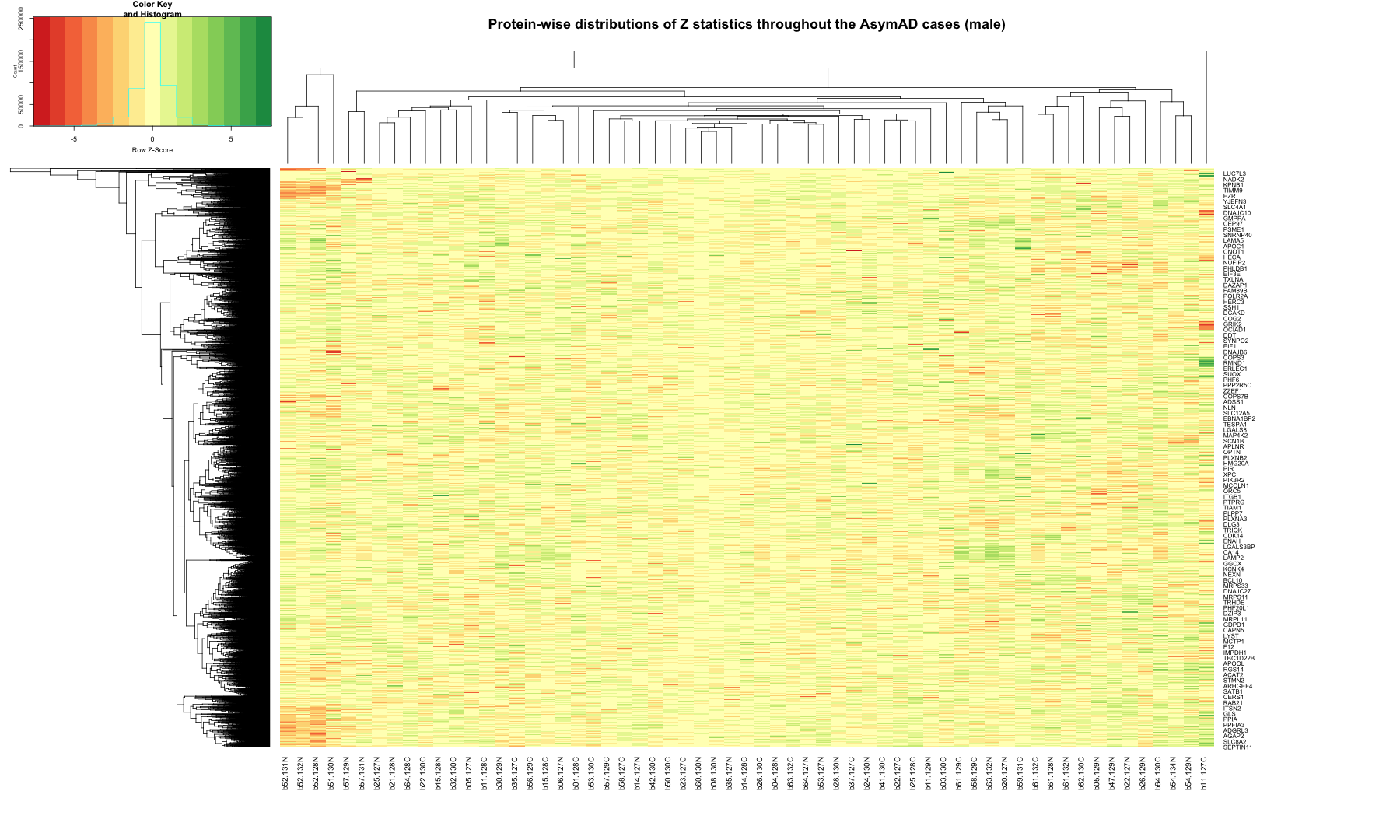
# Print the Z statistics result final table write.table(z_stat_result_plot_AsymAD_male,"z_stat_result_AsymAD_male.txt",sep="\t",quote=FALSE, row.names=FALSE) # Remove the header from the file z_stat_result_matrix_AsymAD_male <- z_stat_result_plot_AsymAD_male[, -1] # Replace NA, NaN, or Inf values with 0 cleaned_matrix_AsymAD_male <- replace(z_stat_result_matrix_AsymAD_male, is.na(z_stat_result_matrix_AsymAD_male), 0) # Set up the color scale using RColorBrewer color_scale <- colorRampPalette(brewer.pal(9, "RdYlGn")) # Plot the heatmap out_zscore_AsymAD_male <- heatmap.2( as.matrix(cleaned_matrix_AsymAD_male), Rowv = TRUE, Colv = TRUE, col = color_scale, scale = "row", trace = "none", margins = c(10, 20), key = TRUE, keysize = 1, cexCol = 1, cexRow = 0.8, labCol = sample_data_DLPFC_AsymAD_male$batch.channel, labRow = z_stat_result_plot_AsymAD_male$Protein_name, dendrogram = "both", main = "Protein-wise distributions of Z statistics throughout the AsymAD cases (male)" )

Calculating Z score for Control Samples using Leave-one-out Method
library(ggplot2) library(RColorBrewer) library(scales) library(gplots) library(dplyr) library(tidyr) ## Function to calculate the Z-statistics for Indivual control samples (Female only) # Define a function to calculate z-score calculate_zscore <- function(one_sample_data, rest_data) { # Calculate mean and standard deviation for each row (gene) in rest_data rest_data_mean <- rowMeans(rest_data, na.rm=T) rest_data_sd <- apply(rest_data, 1, sd, na.rm=TRUE) # Calculate z-score for each gene in gene_data zscore <- (one_sample_data - rest_data_mean) / rest_data_sd return(zscore) } # Remove the MEAN and SD columns from protein_data_DLPFC_CT_female file protein_data_DLPFC_CT_female <- subset(protein_data_DLPFC_CT_female, select = -c(MEAN, SD)) # Create an empty data frame to store the z-scored data zscored_protein_data_DLPFC_CT_female <- data.frame(Protein_name = protein_data_DLPFC_CT_female$Protein_name) # Iterate through each column in the original data for (col in colnames(protein_data_DLPFC_CT_female)[-1]) { # Split data into two data frames: one with current column and another with the rest protein_data_DLPFC_CT_female_one_sample <- protein_data_DLPFC_CT_female[, c("Protein_name", col)] protein_data_DLPFC_CT_female_rest <- protein_data_DLPFC_CT_female[, -which(names(protein_data_DLPFC_CT_female) == col)] # Calculate z-score for current column zscore <- calculate_zscore(protein_data_DLPFC_CT_female_one_sample[, 2], protein_data_DLPFC_CT_female_rest[, -1]) # Add z-score as a new column to zscored_data zscored_protein_data_DLPFC_CT_female[paste0(col, "_Zscore")] <- zscore } # Write the z-scored data to a text file write.table(zscored_protein_data_DLPFC_CT_female, "z_stat_result_CT_female.txt", sep="\t", quote=FALSE, row.names=FALSE) # Print the table using DT datatable(zscored_protein_data_DLPFC_CT_female, options = list(pageLength = 5, autoWidth = TRUE))
## Warning in instance$preRenderHook(instance): It seems your data is too big for ## client-side DataTables. You may consider server-side processing: ## https://rstudio.github.io/DT/server.html

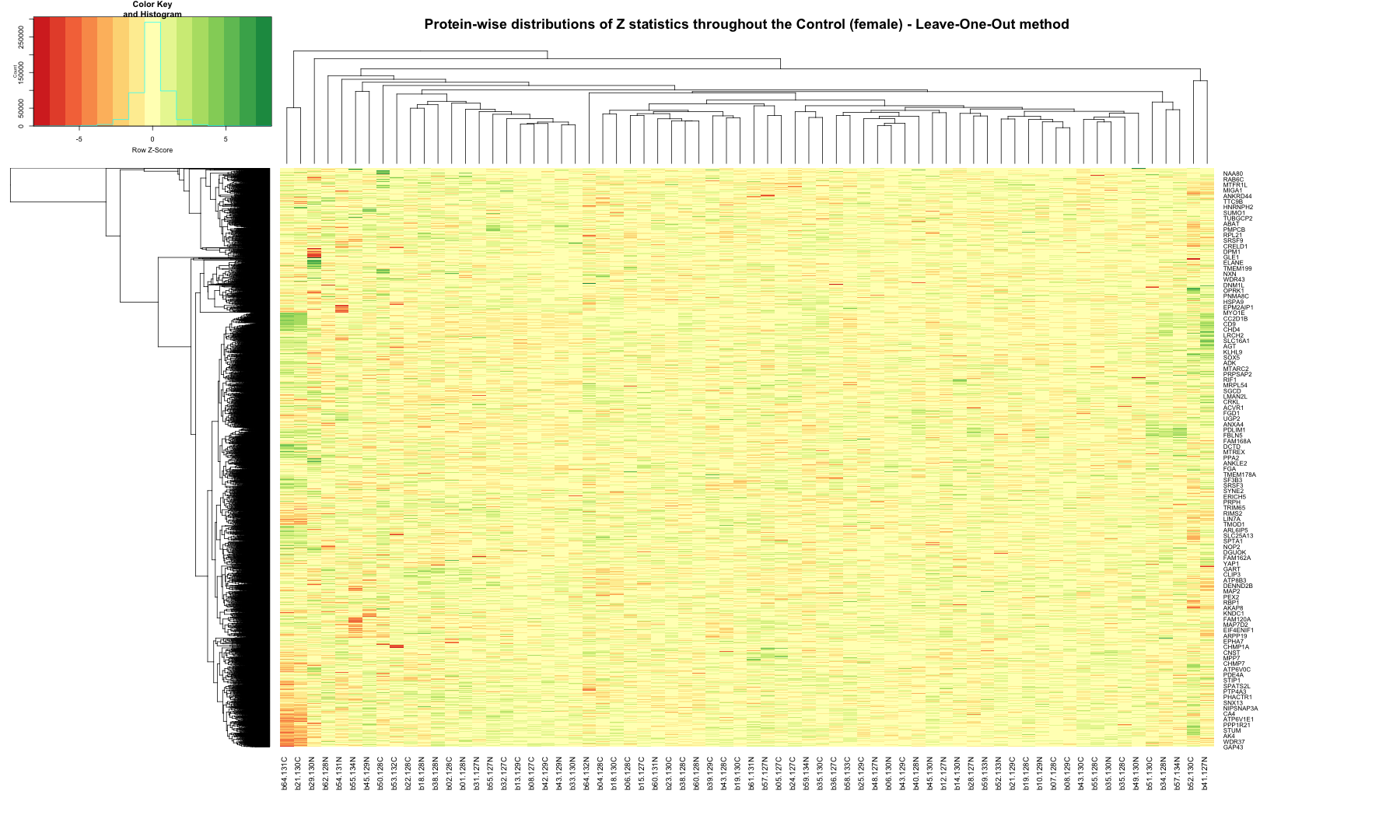
# Remove the header from the file z_stat_result_matrix_DLPFC_CT_female <- zscored_protein_data_DLPFC_CT_female[, -1] # Replace NA, NaN, or Inf values with 0 cleaned_matrix_DLPFC_CT_female <- replace(z_stat_result_matrix_DLPFC_CT_female, is.na(z_stat_result_matrix_DLPFC_CT_female), 0) # Set up the color scale using RColorBrewer color_scale <- colorRampPalette(brewer.pal(9, "RdYlGn")) # Plot the heatmap out_zscore_CT_female <- heatmap.2( as.matrix(cleaned_matrix_DLPFC_CT_female), Rowv = TRUE, Colv = TRUE, col = color_scale, scale = "row", trace = "none", margins = c(10, 20), key = TRUE, keysize = 1, cexCol = 1, cexRow = 0.8, labCol = sample_data_DLPFC_CT_female$batch.channel, labRow = zscored_protein_data_DLPFC_CT_female$Protein_name, dendrogram = "both", main = "Protein-wise distributions of Z statistics throughout the Control (female) - Leave-One-Out method" )

######################################################################################################################################### ## Function to calculate the Z-statistics for Indivual control samples (male only) # Define a function to calculate z-score calculate_zscore <- function(one_sample_data, rest_data) { # Calculate mean and standard deviation for each row (gene) in rest_data rest_data_mean <- rowMeans(rest_data, na.rm=T) rest_data_sd <- apply(rest_data, 1, sd, na.rm=TRUE) # Calculate z-score for each gene in gene_data zscore <- (one_sample_data - rest_data_mean) / rest_data_sd return(zscore) } # Remove the MEAN and SD columns from protein_data_DLPFC_CT_male file protein_data_DLPFC_CT_male <- subset(protein_data_DLPFC_CT_male, select = -c(MEAN, SD)) head(protein_data_DLPFC_CT_male)
## Protein_name b01.130C b03.130N b05.129C b08.128N b10.127C ## 1 A1BG 0.07522644 0.01049928 -0.38764997 0.243596496 -0.11007517 ## 2 A2M -0.01638754 -0.20882544 -0.42849554 0.346760627 0.22284874 ## 3 AAAS 0.09412167 -0.09733347 -0.01690533 -0.003941666 0.03645668 ## 4 AACS 0.27039774 0.34812819 -0.01998668 0.001447416 0.07696687 ## 5 AADAT NA NA NA -0.055266808 0.07488265 ## 6 AAGAB NA -0.01736552 -0.12735403 -0.094613738 0.01467970 ## b10.129C b13.127N b13.128C b13.130N b15.129N b15.129C ## 1 0.039374980 -0.12334365 0.48285813 -0.11052001 0.265567204 0.03242793 ## 2 -0.122806181 -0.09547270 0.32944957 0.04372649 0.120811999 -0.27972574 ## 3 -0.013873596 -0.05095717 0.01962923 -0.03132893 -0.009604864 -0.15527844 ## 4 -0.184619029 0.34372445 -0.01271072 -0.16474579 -0.260986107 0.18793346 ## 5 -0.209884187 -0.05712880 -0.04914365 0.12234443 0.029881493 0.10766624 ## 6 -0.009005097 -0.04961470 0.03148344 -0.02336453 0.048023404 0.18872509 ## b16.127C b16.128C b19.130N b23.129N b23.129C b25.129N ## 1 -0.658140957 -0.17522137 -0.152890682 0.56130018 0.134415815 -0.10115084 ## 2 0.005634151 -0.24931209 0.176318404 0.40036444 -0.149961247 0.61211720 ## 3 -0.128291987 -0.02081564 -0.277512318 0.14404367 -0.002412621 0.02929455 ## 4 0.358391164 -0.02660165 -0.009309738 0.05331121 0.020740996 0.06072607 ## 5 0.290407919 -0.05352320 0.033688091 0.13551743 0.178063071 0.04833438 ## 6 -0.095040661 -0.36811804 -0.356213312 -0.11204867 0.073960679 0.12072136 ## b26.127N b26.128C b31.127C b31.129C b34.129C b36.129C ## 1 -0.05238164 -0.25842410 -0.2308913460 0.71573038 -0.173508009 -0.18383794 ## 2 0.12512938 -0.26555326 -0.7218818237 0.22319427 0.259500447 -0.03234746 ## 3 0.04252733 0.07708008 NA NA 0.065509050 0.04760535 ## 4 -0.29199726 0.03346906 -0.1528273775 -0.32034408 0.061611148 0.01082155 ## 5 -0.18947445 -0.18257143 0.0008840581 -0.37638592 0.259482043 -0.06028534 ## 6 0.19956377 -0.06125976 0.0447929171 -0.07605593 0.002081567 -0.02907103 ## b37.128C b38.130N b39.128N b39.130N b40.130N b42.127N ## 1 0.498970953 0.02205642 -0.22136009 -0.00362460 -0.18485373 0.03501994 ## 2 0.443124051 0.17287314 -0.55981690 0.18847658 -0.39522665 0.06299657 ## 3 -0.122572040 0.02863834 -0.06901860 -0.11647235 NA 0.28141848 ## 4 -0.196894485 -0.01979126 0.02328353 -0.08791205 -0.01082766 -0.05726040 ## 5 -0.232087826 0.18869156 -0.01661543 -0.24014309 -0.19842322 -0.10870400 ## 6 -0.002329597 -0.03122973 0.05709716 -0.61689105 -0.06272829 -0.15272340 ## b42.129N b43.128N b47.130N b50.128N b50.129C b51.127C ## 1 0.23101010 0.054419708 -0.60656087 -0.05814381 -0.02985998 0.032201627 ## 2 0.20128122 -0.171382323 -0.48175771 -0.12562827 -0.03403016 -0.136486259 ## 3 0.10298537 0.085204069 0.04376354 0.01933100 0.03913369 NA ## 4 0.14781649 0.003389672 -0.18459186 0.11597255 0.01739278 -0.002773757 ## 5 -0.06260333 -0.466799611 0.15574291 NA NA 0.092747373 ## 6 0.61080645 -0.106022484 -0.15162345 -0.04979465 -0.11788490 -0.017378245 ## b53.127C b53.129C b55.131N b55.133C b56.130N b59.129C ## 1 -0.07261611 0.05992517 -0.43664146 0.73679790 -3.072878e-01 6.148035e-06 ## 2 -0.14588297 0.22431556 0.29710128 0.23674698 -3.982171e-01 3.742567e-01 ## 3 0.03830866 0.03324911 0.10524136 -0.03546226 5.248207e-05 -3.138770e-01 ## 4 0.02662409 -0.02192296 -0.20019980 0.20536739 9.126714e-02 7.934208e-02 ## 5 0.05691488 -0.02852371 -0.03848905 0.16285916 NA NA ## 6 0.06535928 -0.04319939 -0.01325434 0.03065079 -2.002626e-02 6.176313e-02 ## b60.129N b60.131C b63.130N b63.130C b63.133N ## 1 -0.13667994 -7.034299e-06 0.38465783 -0.004959383 -0.613568495 ## 2 0.06725110 4.592642e-01 -0.04895121 0.164345878 -0.277948686 ## 3 -0.03907452 -1.880341e-01 0.01264241 0.062800631 -0.036283924 ## 4 0.08238154 -6.365986e-02 0.11197464 0.022128982 0.305786367 ## 5 NA NA 0.25562735 -0.032157466 -0.003080984 ## 6 0.09101732 6.603022e-02 0.13557848 -0.091322905 -0.041514652
# Create an empty data frame to store the z-scored data zscored_protein_data_DLPFC_CT_male <- data.frame(Protein_name = protein_data_DLPFC_CT_male$Protein_name) # Iterate through each column in the original data for (col in colnames(protein_data_DLPFC_CT_male)[-1]) { # Split data into two data frames: one with current column and another with the rest protein_data_DLPFC_CT_male_one_sample <- protein_data_DLPFC_CT_male[, c("Protein_name", col)] protein_data_DLPFC_CT_male_rest <- protein_data_DLPFC_CT_male[, -which(names(protein_data_DLPFC_CT_male) == col)] # Calculate z-score for current column zscore <- calculate_zscore(protein_data_DLPFC_CT_male_one_sample[, 2], protein_data_DLPFC_CT_male_rest[, -1]) # Add z-score as a new column to zscored_data zscored_protein_data_DLPFC_CT_male[paste0(col, "_Zscore")] <- zscore } # Write the z-scored data to a text file write.table(zscored_protein_data_DLPFC_CT_male, "z_stat_result_CT_male.txt", sep="\t", quote=FALSE, row.names=FALSE) head(zscored_protein_data_DLPFC_CT_male)
## Protein_name b01.130C_Zscore b03.130N_Zscore b05.129C_Zscore b08.128N_Zscore ## 1 A1BG 0.30441792 0.09048901 -1.24444800 0.86694330 ## 2 A2M -0.08693332 -0.75175357 -1.53968130 1.17653293 ## 3 AAAS 0.97625021 -0.85862770 -0.08809257 0.03488646 ## 4 AACS 1.64483740 2.19608679 -0.23149790 -0.09637722 ## 5 AADAT NA NA NA -0.25267276 ## 6 AAGAB NA 0.04117141 -0.61189965 -0.41650133 ## b10.127C_Zscore b10.129C_Zscore b13.127N_Zscore b13.128C_Zscore ## 1 -0.3077840 0.18585279 -0.3517341 1.7017132 ## 2 0.7381939 -0.45301997 -0.3587359 1.1145299 ## 3 0.4189895 -0.05932849 -0.4119421 0.2586848 ## 4 0.3798653 -1.29152383 2.1638420 -0.1856068 ## 5 0.5202211 -1.19087040 -0.2637299 -0.2163291 ## 6 0.2308287 0.09062339 -0.1495919 0.3304774 ## b13.130N_Zscore b15.129N_Zscore b15.129C_Zscore b16.127C_Zscore ## 1 -0.309256768 0.94144198 0.1629016 -2.23023248 ## 2 0.119311100 0.38435995 -1.0012707 -0.01138171 ## 3 -0.225041928 -0.01883387 -1.4354429 -1.16342359 ## 4 -1.160032336 -1.81189761 1.0923366 2.27177453 ## 5 0.806531096 0.25200780 0.7174939 1.88074437 ## 6 0.005691943 0.42878010 1.2833878 -0.41904124 ## b16.128C_Zscore b19.130N_Zscore b23.129N_Zscore b23.129C_Zscore ## 1 -0.5240600 -0.4497757 1.9906196 0.50084282 ## 2 -0.8937956 0.5762578 1.3704692 -0.54695403 ## 3 -0.1252004 -2.7932683 1.4764090 0.04939156 ## 4 -0.2732480 -0.1641654 0.2304089 0.02514467 ## 5 -0.2423210 0.2746151 0.8868847 1.14985957 ## 6 -2.1360868 -2.0548766 -0.5203889 0.58352802 ## b25.129N_Zscore b26.127N_Zscore b26.128C_Zscore b31.127C_Zscore ## 1 -0.2782459 -0.1170678 -0.8027574 -0.71014730 ## 2 2.1752444 0.3992464 -0.9510992 -2.70306629 ## 3 0.3506817 0.4769984 0.8098429 NA ## 4 0.2772086 -2.0317688 0.1053193 -1.08180140 ## 5 0.3617167 -1.0635417 -1.0207976 0.08007465 ## 6 0.8650972 1.3513209 -0.2185424 0.40956008 ## b31.129C_Zscore b34.129C_Zscore b36.129C_Zscore b37.128C_Zscore ## 1 2.5923665 -0.5183540 -0.55277340 1.7602935 ## 2 0.7394009 0.8666407 -0.14170738 1.5275522 ## 3 NA 0.6977879 0.52561142 -1.1065864 ## 4 -2.2381245 0.2827975 -0.03732917 -1.3734591 ## 5 -2.3080576 1.6729573 -0.28248053 -1.3311784 ## 6 -0.3062558 0.1562258 -0.02805706 0.1301195 ## b38.130N_Zscore b39.128N_Zscore b39.130N_Zscore b40.130N_Zscore ## 1 0.12864736 -0.67818360 0.04386759 -0.5561603 ## 2 0.56431060 -2.03934694 0.61846340 -1.4171310 ## 3 0.34442950 -0.58484396 -1.04625411 NA ## 4 -0.23026497 0.04115824 -0.66236389 -0.1737345 ## 5 1.21651027 -0.02356184 -1.38258940 -1.1191890 ## 6 -0.04082435 0.48282427 -4.12796286 -0.2272422 ## b42.127N_Zscore b42.129N_Zscore b43.128N_Zscore b47.130N_Zscore ## 1 0.1714642 0.8244086 0.23557994 -2.0335443 ## 2 0.1854682 0.6629921 -0.62127680 -1.7390278 ## 3 3.0341466 1.0635527 0.88895071 0.4888251 ## 4 -0.4672414 0.8317960 -0.08414149 -1.2913431 ## 5 -0.5714718 -0.2962553 -3.00896160 1.0111887 ## 6 -0.7643756 4.5578943 -0.48444209 -0.7577415 ## b50.128N_Zscore b50.129C_Zscore b51.127C_Zscore b53.127C_Zscore ## 1 -0.1360953 -0.042720851 0.16215407 -0.18390042 ## 2 -0.4627688 -0.147483829 -0.50030514 -0.53282749 ## 3 0.2558490 0.444556567 NA 0.43667481 ## 4 0.6276475 0.004057279 -0.12297307 0.06219912 ## 5 NA NA 0.62747319 0.41284761 ## 6 -0.1506570 -0.555246094 0.04109617 0.53211733 ## b53.129C_Zscore b55.131N_Zscore b55.133C_Zscore b56.130N_Zscore ## 1 0.25378635 -1.41578265 2.6786106 -0.96827282 ## 2 0.74331813 0.99939707 0.7867988 -1.42808968 ## 3 0.38838152 1.08586366 -0.2643358 0.07277817 ## 4 -0.24371565 -1.39562106 1.2070151 0.47047446 ## 5 -0.09409214 -0.15314356 1.0552200 NA ## 6 -0.11162899 0.06548769 0.3255349 0.02543496 ## b59.129C_Zscore b60.129N_Zscore b60.131C_Zscore b63.130N_Zscore ## 1 0.05585142 -0.3959544 0.05580791 1.3520082 ## 2 1.27562701 0.2000812 1.58745970 -0.1987213 ## 3 -3.26016098 -0.2987005 -1.77601906 0.1922852 ## 4 0.39489934 0.4141466 -0.50786556 0.6021503 ## 5 NA NA NA 1.6474572 ## 6 0.51065189 0.6857944 0.53612403 0.9554605 ## b63.130C_Zscore b63.133N_Zscore ## 1 0.03946205 -2.0599774 ## 2 0.53476308 -0.9949709 ## 3 0.67165425 -0.2721505 ## 4 0.03388651 1.8913789 ## 5 -0.11562052 0.0565897 ## 6 -0.39692911 -0.1016615
# Print the table using DT datatable(zscored_protein_data_DLPFC_CT_male, options = list(pageLength = 5, autoWidth = TRUE))
## Warning in instance$preRenderHook(instance): It seems your data is too big for ## client-side DataTables. You may consider server-side processing: ## https://rstudio.github.io/DT/server.html

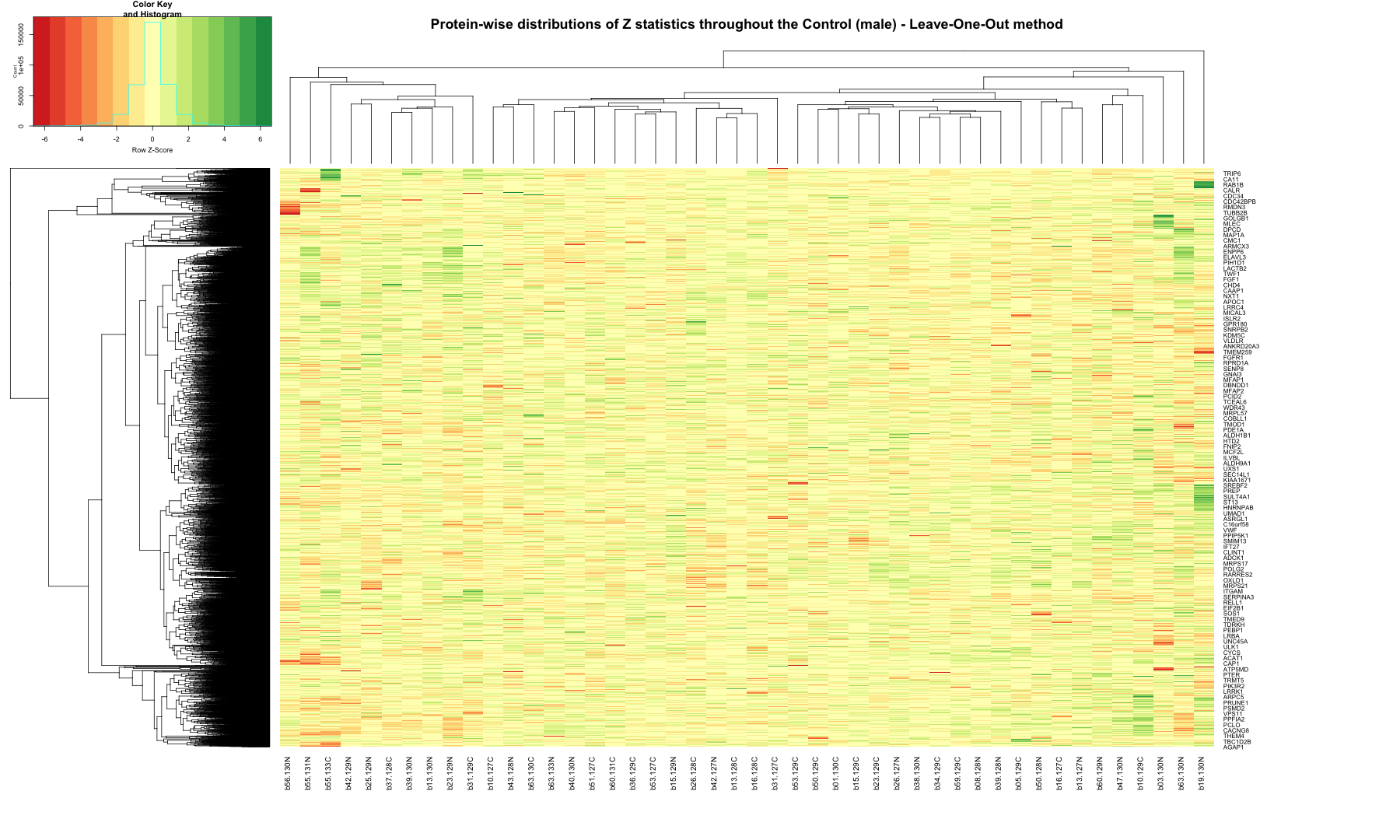
# Remove the header from the file z_stat_result_matrix_DLPFC_CT_male <- zscored_protein_data_DLPFC_CT_male[, -1] # Replace NA, NaN, or Inf values with 0 cleaned_matrix_DLPFC_CT_male <- replace(z_stat_result_matrix_DLPFC_CT_male, is.na(z_stat_result_matrix_DLPFC_CT_male), 0) # Set up the color scale using RColorBrewer color_scale <- colorRampPalette(brewer.pal(9, "RdYlGn")) # Plot the heatmap out_zscore_CT_male <- heatmap.2( as.matrix(cleaned_matrix_DLPFC_CT_male), Rowv = TRUE, Colv = TRUE, col = color_scale, scale = "row", trace = "none", margins = c(10, 20), key = TRUE, keysize = 1, cexCol = 1, cexRow = 0.8, labCol = sample_data_DLPFC_CT_male$batch.channel, labRow = zscored_protein_data_DLPFC_CT_male$Protein_name, dendrogram = "both", main = "Protein-wise distributions of Z statistics throughout the Control (male) - Leave-One-Out method" )

# Save the plot as a high-resolution PNG ggsave("out_zscore_CT_male.tiff", plot = out_zscore_CT_male, dpi = 300, width = 6, height = 4, units = "in")
## Error in UseMethod("grid.draw"): no applicable method for 'grid.draw' applied to an object of class "c('integer', 'numeric')"