PHASE 1 and 2 TMT PROTEOMICS MERGED: ROSMAP TMT-proteomics Data (read count file)
library(stringr) library(dplyr)
library(ggplot2)
## Warning: package 'ggplot2' was built under R version 4.5.2
library(tidyr) library(DT) # Data set: ROSMAP (N=610), Minimally regressed, batch- and set-corrected protein abundance. Batch within set, and inter-set (ROSMAP set1 and set2) correction handled by separate repeats of TAMPOR (proteins kept with <50% missing values within sets); 610 total cases (syn28723003) protein_data <- read.csv("/Users/poddea/Desktop/ROSMAP_data_100623/TMT_proteomics/Round2/2a.Zero-centered_log2(abundance)-ROSMAP610.R1+R2-2xTAMPORcorrected.csv", sep =",", header = TRUE, stringsAsFactors = FALSE) dim(protein_data)
## [1] 7814 611
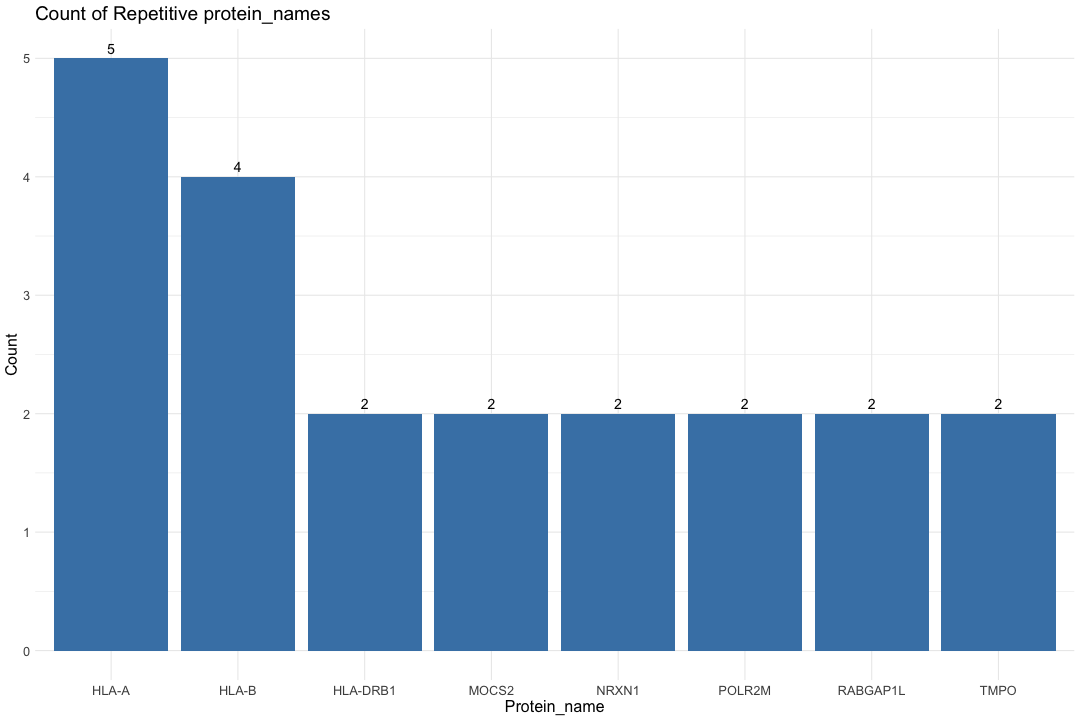
#head(protein_data) # Split the protein_ID column by "|" split_protein_data <- str_split_fixed(protein_data$X, "\\|", 2) # Combine the split data with the original dataframe protein_data$Protein_name <- split_protein_data[, 1] protein_data$Uniprot_ID <- split_protein_data[, 2] # Count the repetitive Protein_name count_data <- protein_data %>% group_by(Protein_name) %>% summarise(count = n()) %>% filter(count > 1) # Print the number of repetitive protein_name cat("Number of repetitive protein_name:", nrow(count_data), "\n")
## Number of repetitive protein_name: 8
# Create a horizontal bar chart ggplot(count_data, aes(x = reorder(Protein_name, -count), y = count)) + geom_bar(stat = "identity", fill = "steelblue") + labs(title = "Count of Repetitive protein_names", x = "Protein_name", y = "Count") + geom_text(aes(label = count), vjust = -0.5, size = 5) + # Add text annotations + theme_minimal() + theme(text = element_text(size=16))

# Find the row (Protein_name) with the highest absolute row sum across all columns for each repetitive Protein_name protein_data_filtered <- protein_data %>% group_by(Protein_name) %>% slice(which.max(abs(rowSums(across(starts_with("b"), is.numeric), na.rm = TRUE)))) %>% ungroup() dim(protein_data_filtered)
## [1] 7801 613
################################################################################################################################################################# ## INPUT data File Filtering - Remove proteins without given name (symbol) ## Used "Protein_name as first column in the data file" # Filter rows where Protein_name is not 0 protein_data_filtered <- protein_data_filtered[protein_data_filtered$Protein_name != "0", ] # Print the number of IDs with protein_name cat("Number of IDs with protein_name:", nrow(protein_data_filtered), "\n")
## Number of IDs with protein_name: 7800
# Remove the Uniprot_ID column protein_data_filtered$Uniprot_ID <- NULL # Replace the first column with Protein_name #protein_data_filtered$X <- protein_data_filtered$Protein_name # Move Protein_name to the first column protein_data_filtered <- protein_data_filtered[, c("Protein_name", setdiff(names(protein_data_filtered), "Protein_name"))] # Remove the "X" column protein_data_filtered$X <- NULL dim(protein_data_filtered)
## [1] 7800 611
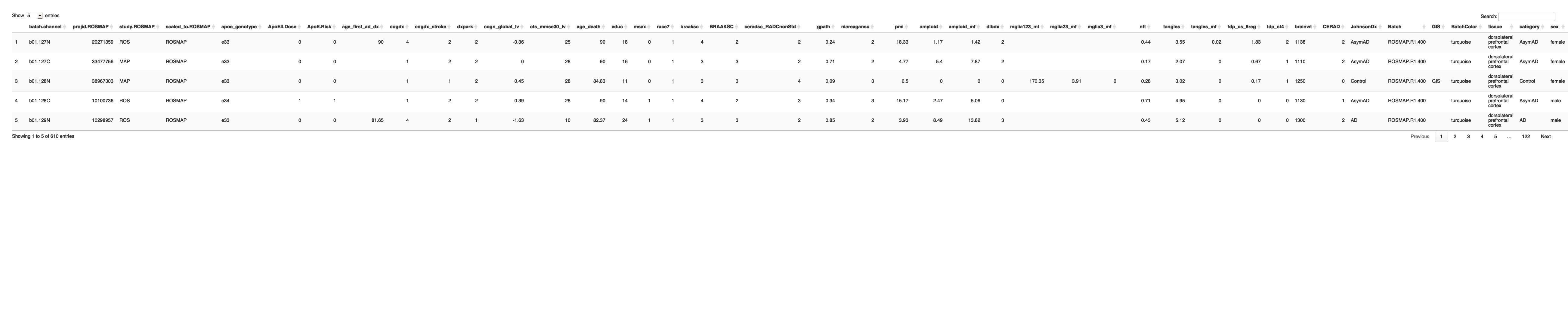
# Print the table using DT datatable(protein_data_filtered, options = list(pageLength = 5, autoWidth = TRUE))
## Warning in instance$preRenderHook(instance): It seems your data is too big for ## client-side DataTables. You may consider server-side processing: ## https://rstudio.github.io/DT/server.html

Data Missingness
#PHASE 1 and 2 TMT PROTEOMICS MERGED: ROSMAP TMT-proteomics Metadata (samples description file)
library(stringr) library(dplyr) library(ggplot2) library(tidyr) library(DT) # Read the TMT metadata file for ROSMAP individuals protein_metadata_ROSMAP <- read.csv("/Users/poddea/Desktop/ROSMAP_data_100623/TMT_proteomics/Round2/2c.traits-ROSMAP610.R1+R2-2xTAMPORcorrected.csv", sep =",", header = TRUE, stringsAsFactors = FALSE) #protein_metadata_ROSMAP <- read.table("/Users/poddea/Desktop/ROSMAP_data_100623/TMT_proteomics/Round2/ROSMAP_Covariates_ages_censored.tsv", sep ="\t", header = TRUE, stringsAsFactors = FALSE) dim(protein_metadata_ROSMAP)
## [1] 610 41
# Define the catagory (diagnosis) based on the braaksc, CERAD and cogdx #protein_metadata_ROSMAP$category <- with(protein_metadata_ROSMAP, ifelse(braaksc >= 4 & ceradsc_RADCnonStd <= 2 & cogdx == 4, "AD", #ifelse(braaksc <= 3 & ceradsc_RADCnonStd >= 3 & cogdx == 1, "CT", "OTHER"))) # Define the category based on Braak, CERAD, and MMSE (cognitive status) protein_metadata_ROSMAP$category <- with(protein_metadata_ROSMAP, ifelse((CERAD %in% 0:1 & braaksc %in% 0:2 & cts_mmse30_lv >= 24) | (CERAD == 0 & braaksc == 3 & cts_mmse30_lv >= 24), "Control", ifelse(CERAD %in% 1:3 & braaksc %in% 3:6 & cts_mmse30_lv >= 24, "AsymAD", ifelse(CERAD %in% 2:3 & braaksc %in% 3:6 & cts_mmse30_lv < 24, "AD", "Exclude")))) # Define the category based on Braak, CERAD, and MMSE (cognitive status) #protein_metadata_ROSMAP$category <- with(protein_metadata_ROSMAP, #ifelse((CERAD %in% 0:1 & braaksc %in% 0:2 & cts_mmse30_lv >= 24) | #(CERAD == 0 & braaksc == 3 & cts_mmse30_lv >= 24), "Control", #ifelse(CERAD %in% 1:3 & braaksc %in% 3:6 & cts_mmse30_lv >= 24, "AsymAD", #ifelse(CERAD %in% 2:3 & braaksc %in% 3:6 & cts_mmse30_lv < 24, "AD", "Exclude")))) # Define the sex_type (sex) based on the msex value protein_metadata_ROSMAP$sex <- with(protein_metadata_ROSMAP, ifelse(msex == 0, "female", ifelse(msex == 1, "male", "NA"))) write.table(protein_metadata_ROSMAP,"Protein_metadata_ROSMAP_catagory.txt",sep="\t",quote=F) # Print the table using DT datatable(protein_metadata_ROSMAP, options = list(pageLength = 5, autoWidth = TRUE))

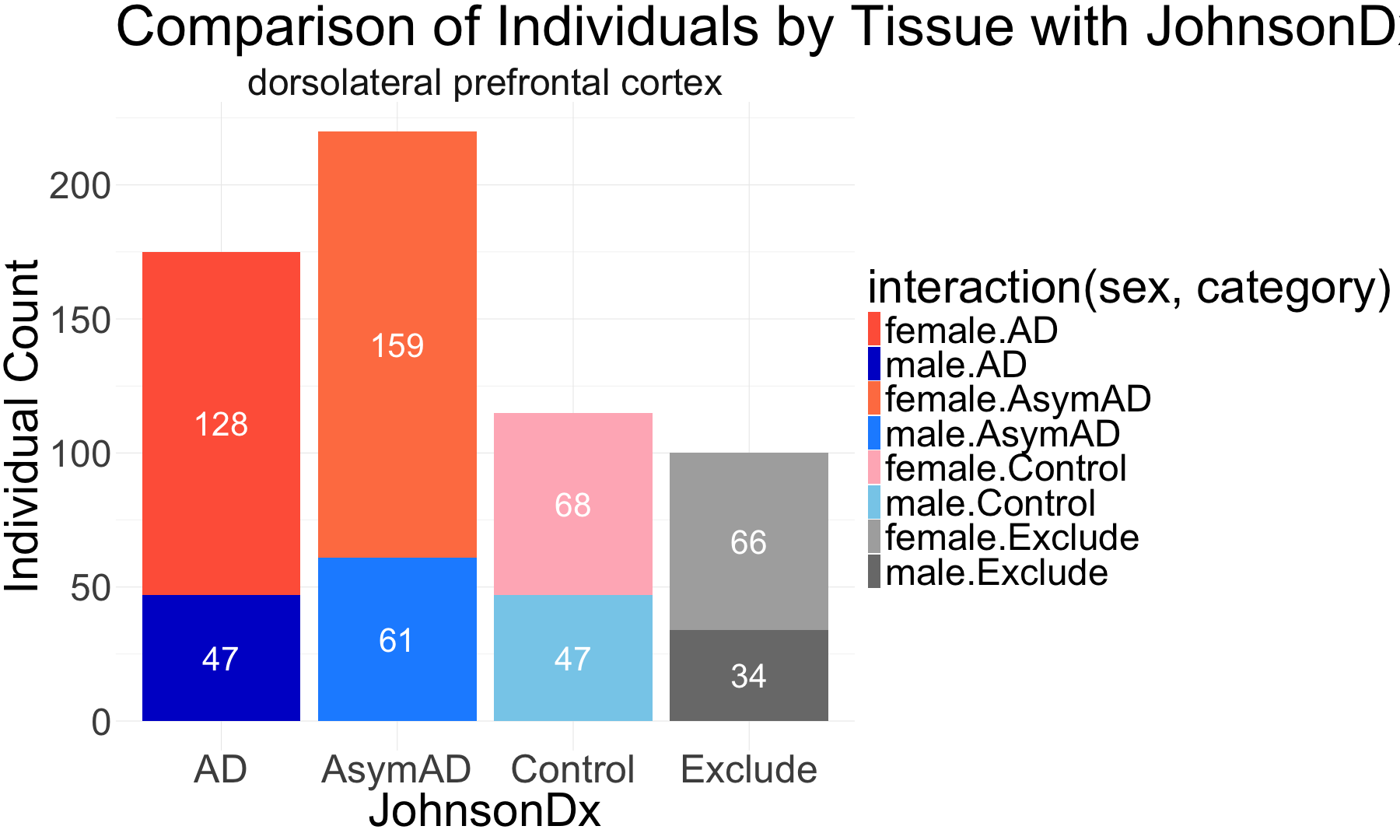
##################################################################################################################################################################################### ##################################################################################################################################################################################### # Group the data by tissue, JohnsonDx, and sex # Ensure JohnsonDx is ordered as CT, AsymAD, AD, Exclude count_protein_metadata <- protein_metadata_ROSMAP %>% group_by(tissue, category, sex) %>% summarise(count = n(), .groups = 'drop') %>% mutate( JohnsonDx = factor(category, levels = c("Control", "AsymAD", "AD", "Exclude")) ) # Create a grouped and stacked bar plot with manual color coding ggplot(count_protein_metadata, aes(x = category, y = count, fill = interaction(sex, category))) + geom_bar(stat = "identity", position = "stack") + # Stacked by sex within each JohnsonDx facet_wrap(~ tissue) + # Create separate plots for each tissue labs( title = "Comparison of Individuals by Tissue with JohnsonDx Staged by Sex", x = "JohnsonDx", y = "Individual Count" ) + scale_fill_manual( values = c( "male.AD" = "mediumblue", "female.AD" = "tomato", "male.AsymAD" = "dodgerblue", "female.AsymAD" = "coral", "male.Control" = "skyblue", "female.Control" = "lightpink", "male.Exclude" = "gray48", "female.Exclude" = "gray68" ) ) + geom_text(aes(label = count), position = position_stack(vjust = 0.5), size = 15, color = "white") + # Add counts inside bars theme_minimal() + theme( text = element_text(size = 60), axis.text.x = element_text(size = 50) # Adjust axis text size )

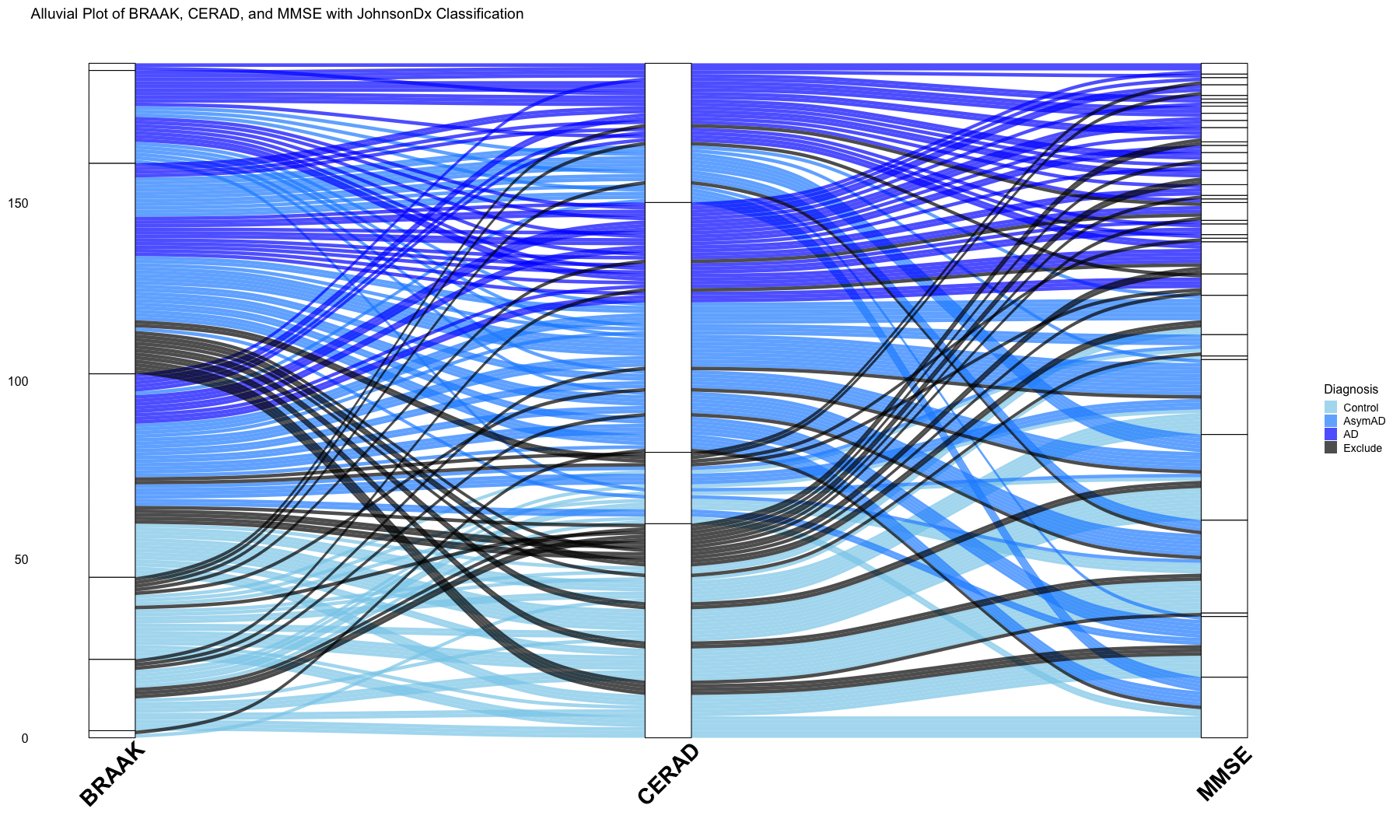
##################################################################################################################################################################################### ##################################################################################################################################################################################### # Alluvial plots implemented here to visualize frequency distributions of braaksc, CERAD and MMSE stages over the diagnosis catagories library(ggalluvial) # Create a subset of the DLPFC sample description file with male samples only sample_data_DLPFC_male <- protein_metadata_ROSMAP[protein_metadata_ROSMAP$sex == "male", ] # Create a subset of the DLPFC sample description file with female samples only sample_data_DLPFC_female <- protein_metadata_ROSMAP[protein_metadata_ROSMAP$sex == "female", ] ## Male # Prepare the data for the alluvial plot sample_data_DLPFC_male <- sample_data_DLPFC_male %>% mutate( BRAAK = factor(BRAAKSC, levels = sort(unique(BRAAKSC))), CERAD = factor(ceradsc_RADCnonStd, levels = sort(unique(ceradsc_RADCnonStd))), JohnsonDx = factor(category, levels = c("Control", "AsymAD", "AD", "Exclude")) ) # Create the plot with the updated intervals and proper labels ggplot(sample_data_DLPFC_male, aes( axis1 = BRAAK, axis2 = CERAD, axis3 = cts_mmse30_lv, fill = JohnsonDx )) + geom_alluvium(aes(fill = JohnsonDx), alpha = 0.7, width = 1/12) + # Ribbons geom_stratum(fill = "white", color = "black", width = 1/12) + # Stratum rectangles in white scale_fill_manual( values = c("Control" = "skyblue", "AsymAD" = "dodgerblue", "AD" = "blue", "Exclude" = "black") ) + labs( title = "Alluvial Plot of BRAAK, CERAD, and MMSE with JohnsonDx Classification", x = "", y = "Count", fill = "Diagnosis" ) + theme_classic(base_size = 16) + theme( axis.line = element_blank(), axis.ticks = element_blank(), axis.text = element_blank(), axis.title = element_blank(), axis.text.x = element_blank(), # Remove X-axis text axis.ticks.x = element_blank(), # Remove X-axis ticks axis.title.x = element_blank(), # Remove X-axis title axis.text.y = element_text(size = 16), legend.text = element_text(size = 14), legend.title = element_text(size = 16), plot.margin = margin(t = 10, r = 10, b = 40, l = 10) # Extra space for labels ) + annotate("text", x = 1, y = -10, label = "BRAAK", size = 10, fontface = "bold", angle = 45) + annotate("text", x = 2, y = -10, label = "CERAD", size = 10, fontface = "bold", angle = 45) + annotate("text", x = 3, y = -10, label = "MMSE", size = 10, fontface = "bold", angle = 45)
## Warning in to_lodes_form(data = data, axes = axis_ind, discern = ## params$discern): Some strata appear at multiple axes. ## Warning in to_lodes_form(data = data, axes = axis_ind, discern = ## params$discern): Some strata appear at multiple axes.

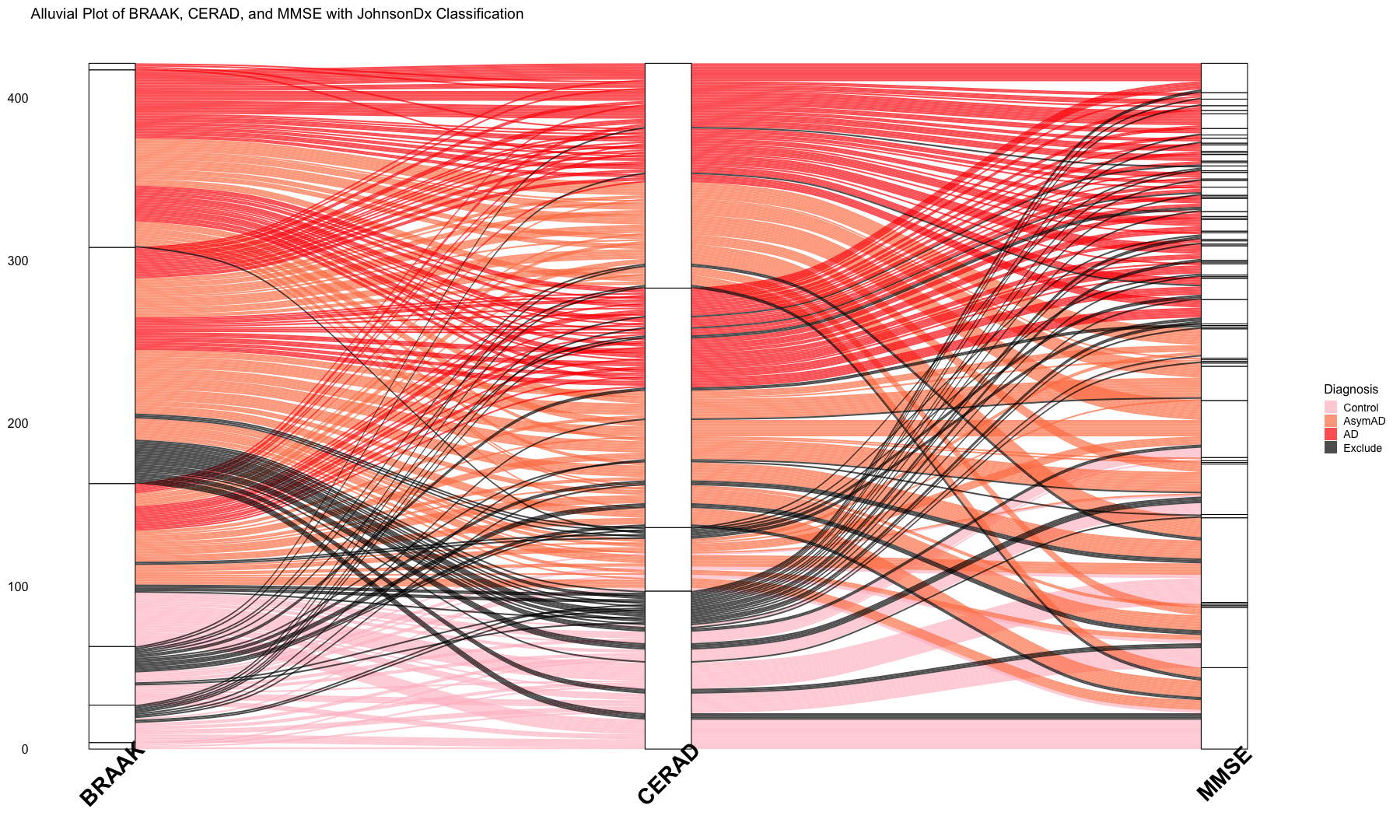
##################################################################################################################################################################################### ## Female # Prepare the data for the alluvial plot sample_data_DLPFC_female <- sample_data_DLPFC_female %>% mutate( BRAAK = factor(BRAAKSC, levels = sort(unique(BRAAKSC))), ceradsc = factor(ceradsc_RADCnonStd, levels = sort(unique(ceradsc_RADCnonStd))), JohnsonDx = factor(category, levels = c("Control", "AsymAD", "AD", "Exclude")) ) # Create the plot with the updated intervals and proper labels ggplot(sample_data_DLPFC_female, aes( axis1 = BRAAK, axis2 = ceradsc, axis3 = cts_mmse30_lv, fill = JohnsonDx )) + geom_alluvium(aes(fill = JohnsonDx), alpha = 0.7, width = 1/12) + # Ribbons geom_stratum(fill = "white", color = "black", width = 1/12) + # Stratum rectangles in white scale_fill_manual( values = c("Control" = "pink", "AsymAD" = "coral", "AD" = "red", "Exclude" = "black") ) + labs( title = "Alluvial Plot of BRAAK, CERAD, and MMSE with JohnsonDx Classification", x = "", y = "Count", fill = "Diagnosis" ) + theme_classic(base_size = 16) + theme( axis.line = element_blank(), axis.ticks = element_blank(), axis.text = element_blank(), axis.title = element_blank(), axis.text.x = element_blank(), # Remove X-axis text axis.ticks.x = element_blank(), # Remove X-axis ticks axis.title.x = element_blank(), # Remove X-axis title axis.text.y = element_text(size = 16), legend.text = element_text(size = 14), legend.title = element_text(size = 16), plot.margin = margin(t = 10, r = 10, b = 40, l = 10) # Extra space for labels ) + annotate("text", x = 1, y = -15, label = "BRAAK", size = 10, fontface = "bold", angle = 45) + annotate("text", x = 2, y = -15, label = "CERAD", size = 10, fontface = "bold", angle = 45) + annotate("text", x = 3, y = -15, label = "MMSE", size = 10, fontface = "bold", angle = 45)

## Warning in to_lodes_form(data = data, axes = axis_ind, discern = ## params$discern): Some strata appear at multiple axes. ## Warning in to_lodes_form(data = data, axes = axis_ind, discern = ## params$discern): Some strata appear at multiple axes.

Genes by Variance: PCA plot for most variance genes in the read count data (Tissue: DLPFC)
#Data Missingness
# Load required libraries library(dplyr) # Step 1: Calculate missing values per sample protein_data_ROSMAP_sample_missingness <- protein_data_filtered[, -1] # Remove "Protein_name" column protein_data_ROSMAP_sample_missingness_t <- t(protein_data_ROSMAP_sample_missingness) # Transpose # Calculate the number of NA values for each sample na_counts_sample <- apply(protein_data_ROSMAP_sample_missingness_t, 1, function(x) sum(is.na(x))) # Convert to DataFrame missingness_df <- data.frame(SampleID = rownames(protein_data_ROSMAP_sample_missingness_t), MissingCount = na_counts_sample) ##################################################################################################################################################################################### print(dim(missingness_df)) # Check dimensions
## [1] 610 2
print(head(missingness_df)) # View first few rows
## SampleID MissingCount ## b01.127N b01.127N 1517 ## b01.127C b01.127C 1517 ## b01.128N b01.128N 1517 ## b01.128C b01.128C 1517 ## b01.129N b01.129N 1517 ## b01.129C b01.129C 1518
# Check column names print(colnames(protein_metadata_ROSMAP))
## [1] "batch.channel" "projid.ROSMAP" "study.ROSMAP" ## [4] "scaled_to.ROSMAP" "apoe_genotype" "ApoE4.Dose" ## [7] "ApoE.Risk" "age_first_ad_dx" "cogdx" ## [10] "cogdx_stroke" "dxpark" "cogn_global_lv" ## [13] "cts_mmse30_lv" "age_death" "educ" ## [16] "msex" "race7" "braaksc" ## [19] "BRAAKSC" "ceradsc_RADCnonStd" "gpath" ## [22] "niareagansc" "pmi" "amyloid" ## [25] "amyloid_mf" "dlbdx" "mglia123_mf" ## [28] "mglia23_mf" "mglia3_mf" "nft" ## [31] "tangles" "tangles_mf" "tdp_cs_6reg" ## [34] "tdp_st4" "brainwt" "CERAD" ## [37] "JohnsonDx" "Batch" "GIS" ## [40] "BatchColor" "tissue" "category" ## [43] "sex"
print(colnames(missingness_df))
## [1] "SampleID" "MissingCount"
# Check if Sample IDs match between datasets print(setdiff(missingness_df$SampleID, protein_metadata_ROSMAP$batch.channel)) # SampleIDs in missingness_df but not in metadata
## character(0)
print(setdiff(protein_metadata_ROSMAP$batch.channel, missingness_df$SampleID)) # SampleIDs in metadata but not in missingness_df
## character(0)
protein_metadata_ROSMAP$batch.channel <- trimws(protein_metadata_ROSMAP$batch.channel) missingness_df$SampleID <- trimws(missingness_df$SampleID) missingness_df$SampleID <- tolower(missingness_df$SampleID) protein_metadata_ROSMAP$batch.channel <- tolower(protein_metadata_ROSMAP$batch.channel) # Step 2: Merge with Metadata (Fix column name mismatch) missingness_df <- merge(missingness_df, protein_metadata_ROSMAP, by.x = "SampleID", by.y = "batch.channel", all.x = TRUE) print(dim(missingness_df)) # Should NOT be 0 rows
## [1] 610 44
print(head(missingness_df)) # Check merged data
## SampleID MissingCount projid.ROSMAP study.ROSMAP scaled_to.ROSMAP ## 1 b01.127c 1517 33477756 MAP ROSMAP ## 2 b01.127n 1517 20271359 ROS ROSMAP ## 3 b01.128c 1517 10100736 ROS ROSMAP ## 4 b01.128n 1517 38967303 MAP ROSMAP ## 5 b01.129c 1518 46291609 MAP ROSMAP ## 6 b01.129n 1517 10298957 ROS ROSMAP ## apoe_genotype ApoE4.Dose ApoE.Risk age_first_ad_dx cogdx cogdx_stroke dxpark ## 1 e33 0 0 NA 1 2 2 ## 2 e33 0 0 90.00 4 2 2 ## 3 e34 1 1 NA 1 2 2 ## 4 e33 0 0 NA 1 1 2 ## 5 e33 0 0 NA 2 2 2 ## 6 e33 0 0 81.65 4 2 1 ## cogn_global_lv cts_mmse30_lv age_death educ msex race7 braaksc BRAAKSC ## 1 0.00 28 90.00 16 0 1 3 3 ## 2 -0.36 25 90.00 18 0 1 4 2 ## 3 0.39 28 90.00 14 1 1 4 2 ## 4 0.45 28 84.83 11 0 1 3 3 ## 5 -0.08 24 87.59 14 0 1 4 2 ## 6 -1.63 10 82.37 24 1 1 3 3 ## ceradsc_RADCnonStd gpath niareagansc pmi amyloid amyloid_mf dlbdx ## 1 2 0.71 2 4.77 5.40 7.87 2 ## 2 2 0.24 2 18.33 1.17 1.42 2 ## 3 3 0.34 3 15.17 2.47 5.06 0 ## 4 4 0.09 3 6.50 0.00 0.00 0 ## 5 2 0.89 2 7.42 7.78 18.42 0 ## 6 2 0.85 2 3.93 8.49 13.82 3 ## mglia123_mf mglia23_mf mglia3_mf nft tangles tangles_mf tdp_cs_6reg tdp_st4 ## 1 NA NA NA 0.17 2.07 0.00 0.67 1 ## 2 NA NA NA 0.44 3.55 0.02 1.83 2 ## 3 NA NA NA 0.71 4.95 0.00 0.00 0 ## 4 170.35 3.91 0 0.28 3.02 0.00 0.17 1 ## 5 NA NA NA 0.48 3.40 0.03 0.00 0 ## 6 NA NA NA 0.43 5.12 0.00 0.00 0 ## brainwt CERAD JohnsonDx Batch GIS BatchColor ## 1 1110 2 AsymAD ROSMAP.R1.400 <NA> turquoise ## 2 1138 2 AsymAD ROSMAP.R1.400 <NA> turquoise ## 3 1130 1 AsymAD ROSMAP.R1.400 <NA> turquoise ## 4 1250 0 Control ROSMAP.R1.400 GIS turquoise ## 5 1192 2 AsymAD ROSMAP.R1.400 <NA> turquoise ## 6 1300 2 AD ROSMAP.R1.400 <NA> turquoise ## tissue category sex ## 1 dorsolateral prefrontal cortex AsymAD female ## 2 dorsolateral prefrontal cortex AsymAD female ## 3 dorsolateral prefrontal cortex AsymAD male ## 4 dorsolateral prefrontal cortex Control female ## 5 dorsolateral prefrontal cortex AsymAD female ## 6 dorsolateral prefrontal cortex AD male
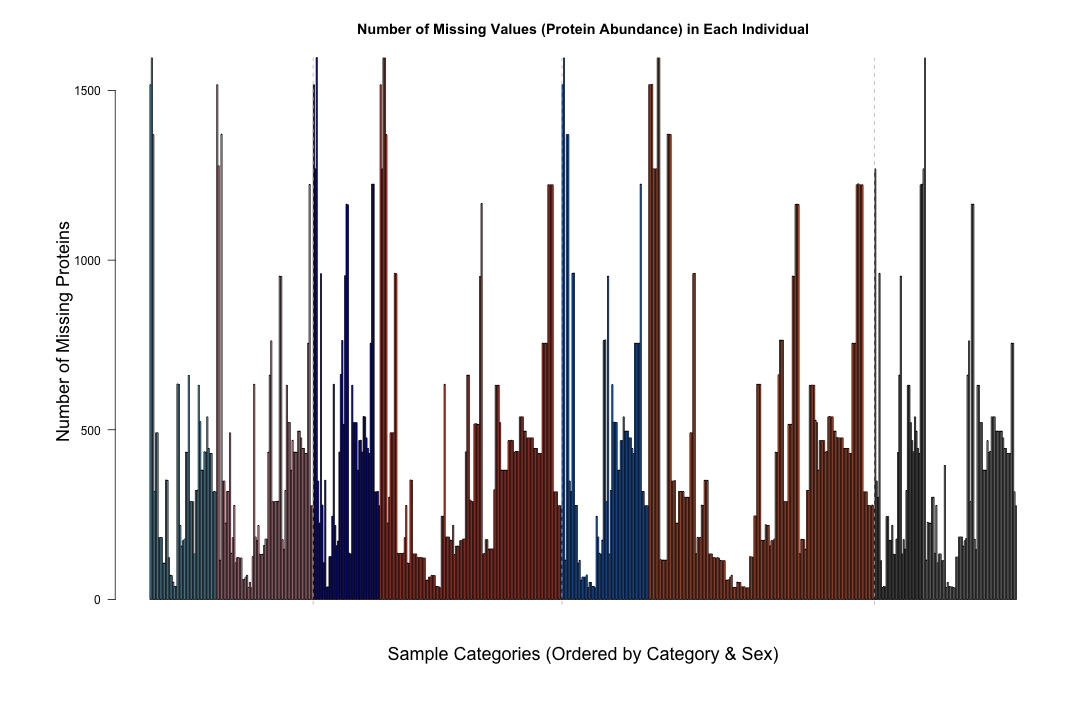
# Step 3: Define Factor Levels for Ordered Sorting category_levels <- c("Control", "AD", "AsymAD", "Exclude") # Define category order sex_levels <- c("male", "female") # Define sex order # Convert to factors with specified order missingness_df$category <- factor(missingness_df$category, levels = category_levels) missingness_df$sex <- factor(missingness_df$sex, levels = sex_levels) # Step 4: Sort Data by Category & Sex missingness_df <- missingness_df %>% arrange(category, sex) # Step 5: Update X-axis Order Based on Sorted Data sorted_sample_ids <- missingness_df$SampleID # Extract sorted sample IDs # Step 6: Generate Barplot with Reordered X-axis # Define colors for each category-sex combination category_sex_colors <- c( "Control.male" = "skyblue", "Control.female" = "lightpink", "AD.male" = "mediumblue", "AD.female" = "tomato", "AsymAD.male" = "dodgerblue", "AsymAD.female" = "coral", "Exclude.male" = "gray48", "Exclude.female" = "gray68" ) # Create a new column that combines category and sex missingness_df$Category_Sex <- paste(missingness_df$category, missingness_df$sex, sep = ".") # Assign colors based on category and sex bar_colors <- category_sex_colors[missingness_df$Category_Sex] par(mar = c(8, 8, 4, 2)) # Bottom, Left, Top, Right margins (in lines) # Create barplot with sample order bar_positions <- barplot(missingness_df$MissingCount, names.arg = rep("", length(sorted_sample_ids)), # Empty x labels main = "Number of Missing Values (Protein Abundance) in Each Individual", xlab = "Sample Categories (Ordered by Category & Sex)", ylab = "Number of Missing Proteins", col = bar_colors, las = 2, cex.names = 2, cex.axis = 1, cex.lab = 1.5) # Get midpoints for category labels category_midpoints <- tapply(bar_positions, missingness_df$category, mean) # Add category labels below the x-axis text(category_midpoints, par("usr")[3] - max(missingness_df$MissingCount) * 0.05, labels = names(category_midpoints), col = "black", font = 2) # Add separator lines between different categories category_change_points <- which(diff(as.numeric(factor(missingness_df$category, levels = category_levels))) != 0) abline(v = bar_positions[category_change_points] + diff(bar_positions)[1] / 2, col = "gray", lty = 2)

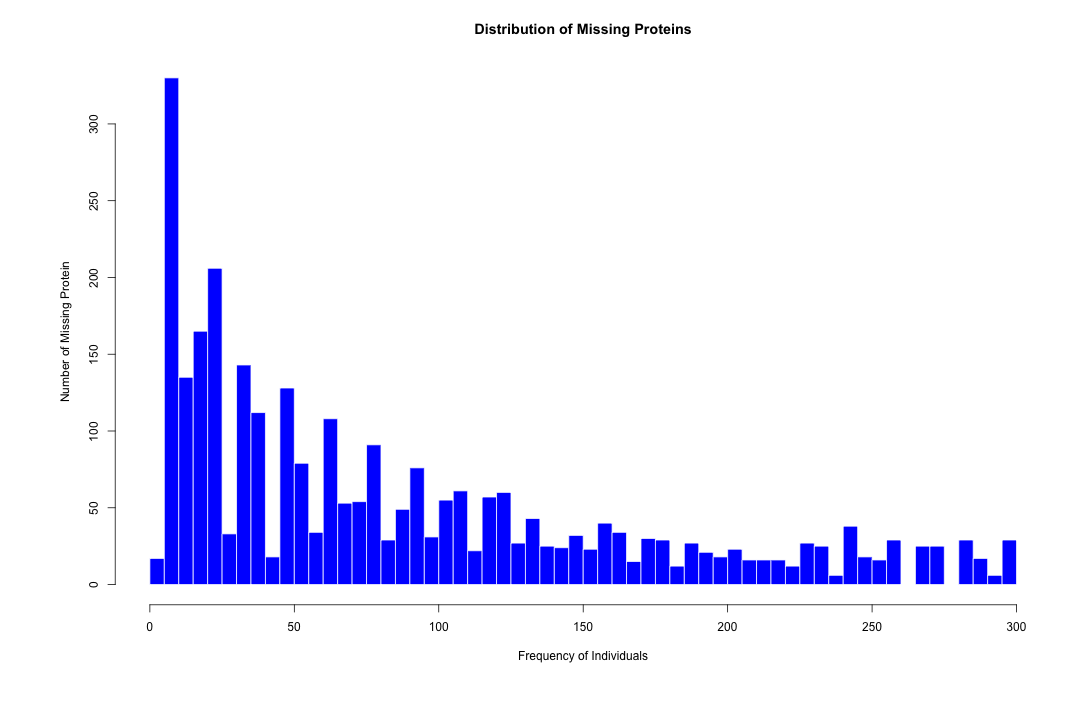
# Add legend for category & sex #legend("topright", legend = names(category_sex_colors), fill = category_sex_colors, title = "Category & Sex", bty = "n", cex = 0.8) ######################################################################################################################################### ##Calculate the missingness for Protein # Remove the first row "Protein_name" from the file protein_data_ROSMAP_gene_missingness <- protein_data_filtered[-1, ] # Calculate the number of NA values in each row na_counts_genes <- apply(protein_data_ROSMAP_gene_missingness, 1, function(x) sum(is.na(x))) # Count the number of rows with at least one NA value num_genes_with_na <- sum(na_counts_genes > 0) # Print the total number of rows with at least one NA value cat("Total number of gene with at least one NA value:", num_genes_with_na, "\n")
## Total number of gene with at least one NA value: 2919
# Count the frequency of each unique NA value na_counts_freq <- table(na_counts_genes) #write.table(na_counts_freq,"/Users/poddea/Desktop/na_counts_freq.txt",sep="\t",quote=F) # Remove the entry for 0 NAs na_counts_freq <- na_counts_freq[names(na_counts_freq) != "0"] # Convert named table to numeric vector na_counts_numeric <- as.numeric(names(na_counts_freq)) na_counts_values <- rep(na_counts_numeric, times = na_counts_freq) # Create a histogram hist(na_counts_values, breaks = 50, # Adjust number of bins main = "Distribution of Missing Proteins", xlab = "Frequency of Individuals", ylab = "Number of Missing Protein", col = "blue", border = "white")

Removal of outlier samples
#Preparation of the input files (Tissue: DLPFC)
#Data Missingness calculation (DLPFC Sample Only) - exclude proteins with more than 50% missingness throughout the DLPFC Sample
# ############################################################################################################################################################ ## Sample-to-Sample distance matrix protein_data_DLPFC_new <- protein_data_DLPFC[, -1] # Transpose the protein abundant file to get sample_IDs in the rows protein_data_DLPFC_t <- t(protein_data_DLPFC_new) dim(protein_data_DLPFC_t) # Compute the Sample-to-Sample Distance Matrix using Euclidean distance distance_matrix <- dist(protein_data_DLPFC_t) # Convert the distance matrix to a data frame distance_df <- as.data.frame(as.matrix(distance_matrix)) write.table(distance_df,"distance_matrix.txt",sep="\t",quote=FALSE, row.names=TRUE) max(distance_df) # Preparing a column annotation file col_ha = HeatmapAnnotation( diagnosis = sample_data_DLPFC$JohnsonDx, sex = sample_data_DLPFC$sex, annotation_height = unit(c(12, 12), "cm"), col = list( diagnosis = c("AD" = "purple", "Control" = "lightgreen", "AsymAD" = "royalblue", "Exclude" = "gray47"), sex = c("male" = "lightblue", "female" = "lightpink") ) ) # Create the heatmap object ht <- Heatmap( as.matrix(distance_matrix), name = "Sample-to-Sample Distance Matrix for DLPFC Sample Only", top_annotation = col_ha, row_names_gp = gpar(fontsize = 10), # Top 10 rows larger column_names_gp = gpar(fontsize = 5) ) # Draw the heatmap draw(ht) end.rcode-->Principal Component Analysis (DLPFC - Control Sample Only)
#Sample-Sample Distance Matrix (DLPFC - Control Sample Only)
#Separate Male and Female Sample Specific Files for Control, AD and AsymAD
#Calculating AD and AsymAD Samples Specific Z-score by Averaging the Control Gruop
#Calculating Z score for Control Samples using Leave-one-out Method
#